
conceptviz vs dmaya
Side-by-side comparison to help you choose the right product.

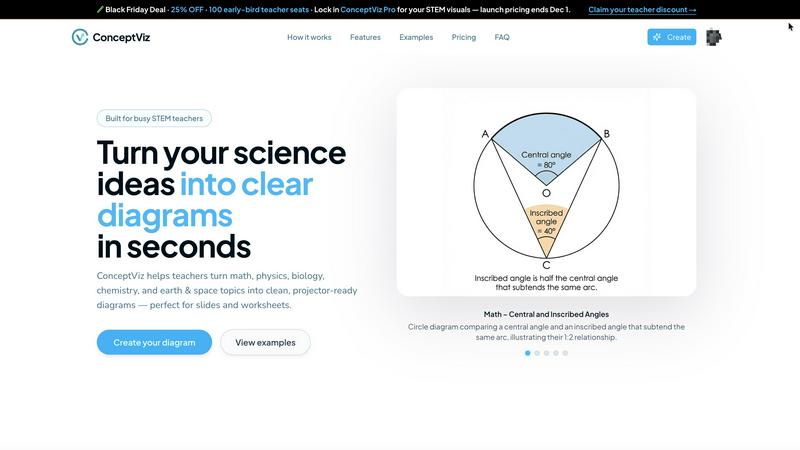
ConceptViz simplifies science and math teaching by turning complex concepts into clear, ready-to-use diagrams.
Last updated: February 28, 2026

dmaya
dMaya is the AI design platform for agencies to generate, iterate, and export client-ready UI designs at the speed of thought.
Last updated: April 13, 2026
Visual Comparison
conceptviz
dmaya
Feature Comparison
conceptviz
User-Friendly Interface
ConceptViz offers a straightforward interface that allows users to create diagrams easily. With just a few clicks, educators can navigate through subjects and grade levels, making the experience seamless and efficient, even for those with no design skills.
Fast Diagram Generation
Users can generate custom diagrams in seconds, significantly reducing preparation time. By simply typing a plain-English description of what they need, educators can quickly receive high-quality visuals that are ready for classroom use.
High-Quality Visuals
The diagrams produced by ConceptViz maintain high contrast and clarity, ensuring they are readable from any distance in a classroom setting. This quality is crucial for effective teaching, as it helps students grasp complex concepts more easily.
Subject & Grade Presets
ConceptViz includes a variety of presets tailored for different subjects and grade levels, from elementary to high school and university. This feature allows educators to select appropriate templates that fit their curriculum, enhancing the relevance and accuracy of the diagrams.
dmaya
Conversational AI Design Agent
Interact with an intelligent AI agent using natural language to generate and refine your designs. Simply describe the interface you need, and receive complete, production-ready UI screens in seconds. The conversation continues as you ask for specific changes—"make the primary color blue," "swap to a sidebar layout," "increase the font size"—and the AI applies these edits precisely and instantly, creating a fluid, iterative design dialogue that accelerates the creative process.
Multi-Screen Infinite Canvas
Work across multiple artboards for different device frames, such as desktop and mobile, on a limitless canvas. Organize, drag, and zoom through your screens in a familiar, Figma-like environment, but with AI handling the initial heavy lifting of layout and component creation. This feature allows you to visualize entire user flows and application ecosystems in one cohesive project space, ensuring a holistic design approach.
Client Presentation & Feedback Portal
Share your work seamlessly by generating a unique, shareable preview link. Clients and stakeholders can view the interactive design directly in their browser without needing an account. They can leave comments and feedback directly on the design, which you can then address in real-time within dmaya. This creates a tight, efficient feedback loop, transforming a traditionally lengthy review cycle into a matter of minutes.
Design-to-Code Export
Once a design is approved, export it as clean, well-structured HTML, CSS, and JavaScript code. This output is specifically crafted to be handed off to AI coding assistants like Claude Code or Cursor, which can then transform it into production-ready code for any modern framework like React, Next.js, or Flutter. This bridges the gap between visual design and technical implementation without sacrificing design intent.
Use Cases
conceptviz
Enhancing Lesson Plans
Educators can use ConceptViz to create visuals that enhance their lesson plans. By generating diagrams that align with their teaching methods, they can provide students with clearer explanations of complex scientific concepts, fostering better understanding.
Streamlining Lab Activities
In laboratory settings, ConceptViz can be utilized to create detailed diagrams that illustrate experimental setups. This can help students visualize procedures, improving their engagement and comprehension during hands-on learning experiences.
Supporting Diverse Learning Styles
ConceptViz caters to various learning styles by providing visual representations of scientific concepts. Educators can address the needs of visual learners and enhance overall classroom engagement by incorporating these custom diagrams into their instruction.
Aiding Research Presentations
Researchers can leverage ConceptViz to create professional-grade visuals for presentations and papers. By generating accurate diagrams that illustrate their findings, they can communicate their research more effectively to a broad audience, including peers and stakeholders.
dmaya
Agency Pitch & Concept Development
Agencies can use dmaya to rapidly generate multiple high-fidelity design concepts during client discovery calls or pitch meetings. By quickly visualizing different creative directions from a text brief, teams can present compelling options to stakeholders in hours instead of weeks, significantly improving their chances of winning projects and aligning visual expectations from the very start.
Product Team Ideation & Prototyping
Product managers and designers can leverage dmaya to explore UI directions and build interactive prototypes before committing engineering resources. This allows for rapid testing of user flows and layout ideas, facilitating better collaboration between design, product, and engineering teams within a single workspace and reducing costly late-stage changes.
Freelancer Project Delivery
Freelancers and independent designers can dramatically increase their capacity and project throughput. dmaya enables the delivery of professional-grade UI designs faster, allowing freelancers to take on more clients or charge a premium for accelerated service. The streamlined client approval process further reduces administrative overhead.
Design System & Consistency Building
Teams building or evolving a design system can use dmaya to generate consistent UI components and screens. The AI's use of design tokens ensures that changes to colors, typography, or spacing are automatically propagated across all screens, maintaining visual coherence and speeding up the creation of a unified component library.
Overview
About conceptviz
ConceptViz is an innovative tool designed to empower educators, students, and researchers by transforming complex scientific concepts into clear, classroom-ready diagrams in mere seconds. Tailored specifically for STEM subjects, it addresses the pressing need for accurate visual explanations that resonate across diverse educational levels, from K-12 to university research. With ConceptViz, users can create projector-ready visuals that enhance lesson plans, labs, and assessments. The main value proposition lies in its simplicity and speed, allowing users to generate custom diagrams that align with their unique teaching methods. By eliminating the frustration of searching for generic images online, ConceptViz ensures that every visual is tailored to specific educational needs, fostering a more engaging learning experience for students. This tool not only saves valuable preparation time for educators but also enhances the clarity and effectiveness of instruction, making it an essential resource in modern classrooms and research environments.
About dmaya
dmaya is the AI-powered design platform purpose-built for the professional creative workflow. It is engineered for agencies, product teams, and freelancers who understand that intentional design must come before code. Unlike AI tools that bypass visual planning, dmaya champions a design-first philosophy, providing the critical space where concepts are visualized, iterated upon, and aligned with stakeholders before any development begins. The core value proposition is speed and precision through collaboration. You describe your vision—a SaaS dashboard, an e-commerce flow, a mobile app—and dmaya's AI agent generates polished, professional UI screens in seconds. The real power lies in conversational iteration: you chat with the AI to refine colors, swap layouts, adjust typography, or add new sections, with every change applied instantly and consistently across your project via design tokens. This cycle of creation and refinement happens at the speed of thought. When the design is ready, you share a client-ready preview link for feedback and approval, a process that condenses days into minutes. Finally, export clean HTML, CSS, and JS to hand off to AI coding agents like Cursor or Claude Code for implementation in React, Next.js, Flutter, or any framework. dmaya is the missing link for teams that present, approve, and ship with confidence.
Frequently Asked Questions
conceptviz FAQ
How does ConceptViz generate diagrams?
ConceptViz generates diagrams by allowing users to input a plain-English description of the visual they need. The tool then translates this description into a clear, high-quality diagram ready for classroom or presentation use.
Is there a free trial available for ConceptViz?
Yes, ConceptViz offers a free trial that allows users to explore the tool's features without any financial commitment. This trial enables educators and researchers to assess its suitability for their needs.
Can I use ConceptViz for subjects other than STEM?
While ConceptViz is primarily designed for STEM subjects, its diagramming capabilities can be adapted for various fields. Users can experiment with different descriptions to create visuals for a broader range of topics.
What formats are the generated diagrams available in?
The diagrams generated by ConceptViz are available in high-resolution PNG format, making them suitable for use in presentations, worksheets, and other educational materials. This ensures that visuals maintain quality regardless of how they are displayed.
dmaya FAQ
How is dmaya different from other AI design tools?
Most AI tools are built for solo enthusiasts and focus on generating code, effectively skipping the crucial visual design and client alignment phase. dmaya is purpose-built for professional teams where design must come first. It provides a full-featured design canvas, focuses on iterative visual refinement through conversation, and integrates client feedback directly into the workflow before any code is written.
What kind of designs can I create with dmaya?
dmaya is versatile and can generate a wide array of professional UI designs. This includes but is not limited to SaaS application dashboards, e-commerce website flows, mobile app screens, landing pages, and web application interfaces. You guide the output by describing your specific needs in plain language.
How does the collaboration with clients work?
You generate a secure, shareable link from any project in dmaya. When you send this link to a client or stakeholder, they can view a high-fidelity, interactive preview of the design in their web browser—no login or account required. They can click on areas of the design to leave contextual comments and feedback, which you will see and can act upon inside your dmaya workspace.
Can I export my designs for development?
Yes. Once a design is finalized and approved, you can export it as clean, semantic HTML, CSS, and JavaScript. This code is not meant for final production but is optimized to be read and understood by AI coding agents (like Cursor or Claude Code) or developers, who can then accurately build the design in your chosen framework such as React, Next.js, or Flutter.
Alternatives
conceptviz Alternatives
ConceptViz is an innovative tool designed for transforming complex scientific and mathematical concepts into clear, ready-to-use diagrams, specifically tailored for educators, students, and researchers within the STEM fields. As a content creation and design tool, it empowers users to create professional-quality visuals quickly and efficiently, addressing the challenges of conveying intricate concepts in an easily digestible format. Users often seek alternatives to ConceptViz for various reasons, including pricing considerations, specific feature requirements, or the need for compatibility with different platforms. When searching for an alternative, it is essential to evaluate the user interface, the range of subjects and grade levels supported, and the clarity of visuals produced. Prioritizing these factors ensures that the chosen tool meets the unique educational needs and enhances the learning experience.
dmaya Alternatives
dmaya is an AI-powered vibe design platform that helps agencies, teams, and freelancers create professional UI designs through conversation. It sits at the intersection of visual design tools and AI code generators, focusing on the critical step of intentional design before development begins. Users often explore alternatives for various reasons, such as budget constraints, specific feature requirements, or integration needs with their existing tech stack. Some may seek tools with different collaboration models or more granular control over the design-to-code workflow. When evaluating other options, consider the core workflow: the ability to generate and iterate on visual designs conversationally, streamline client review and approval, and export clean, usable code. The ideal tool should bridge the gap between creative ideation and technical execution without sacrificing team alignment or client confidence.