
Changeflow vs TinyFast
Side-by-side comparison to help you choose the right product.

Changeflow
Changeflow uses AI to track and summarize only the website changes that matter to your business.
Last updated: March 4, 2026

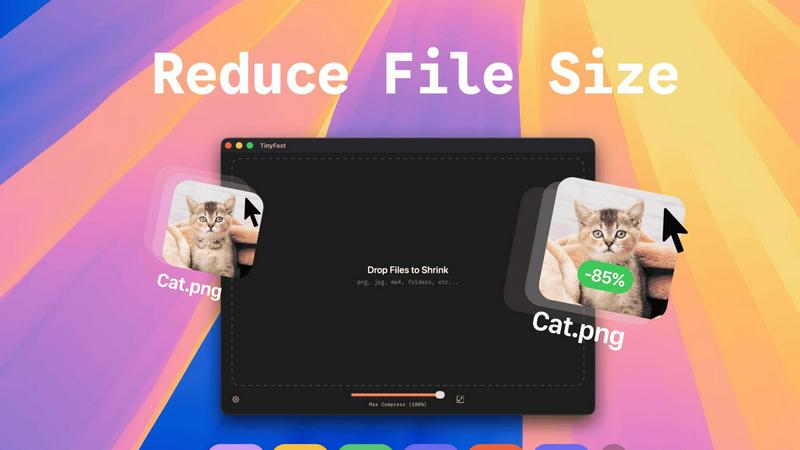
TinyFast instantly shrinks your files privately on your Mac, getting faster and safer with every use.
Last updated: February 28, 2026
Visual Comparison
Changeflow

TinyFast
Feature Comparison
Changeflow
AI-Powered Contextual Intelligence
Changeflow's core AI doesn't just detect changes; it understands them. It reads the content of a webpage, grasps the context of your specific monitoring request, and intelligently filters out irrelevant updates and false positives. This means you are only notified about the changes that are truly significant to your business, saving you from wasting time sifting through noise and screenshots to decipher what actually happened.
Natural Language Setup & Smart Link Following
Forget about technical configuration or RSS feeds. You can set up a monitoring source in seconds by simply describing what you care about in plain English. Furthermore, Changeflow can turn any page with links into an intelligent discovery feed. It will follow new links, read the target pages, determine their relevance based on your criteria, and summarize the important content, automating the process of building a comprehensive monitoring network.
Enterprise-Grade Reliability & Anti-Blocking
Built on over a decade of experience tracking billions of pages, Changeflow offers enterprise-level reliability. Its sophisticated anti-blocking technology ensures a 99.9% success rate at accessing pages that often stump other tools, including those behind logins or with complex JavaScript. This guarantees consistent and dependable monitoring, which is critical for compliance, legal, and competitive intelligence use cases.
Collaborative Workspaces & Forensic Analysis
Changeflow is built for teams. Shared workspaces keep everyone aligned on the latest updates. For deep investigation, the Site Version Control feature provides timestamped archives of every page, allowing you to navigate through time. The interactive change viewer offers a forensic look at updates, highlighting exactly what was added, removed, or modified, so you can understand the full scope of every change.
TinyFast
100% Local & Private Compression
TinyFast is engineered with privacy as its core principle. Every compression task is processed entirely on your Mac. Your files never leave your device, are not uploaded to any cloud server, and remain completely under your control. This is essential for handling files under Non-Disclosure Agreements (NDAs), confidential client work, or any proprietary material, providing total peace of mind and security by design.
Blazing-Fast Batch Processing
Experience workflow acceleration with TinyFast's optimized native engines. You can drag and drop entire folders filled with images, videos, or documents, and the app will shrink them all in seconds. This batch processing capability eliminates the tedious task of compressing files one by one, saving you hours every week and integrating continuous improvement directly into your asset management routine.
Universal File Format Support
TinyFast supports a comprehensive range of common file types, making it a versatile hub for all your compression needs. This includes images (PNG, JPG, TIFF, HEIC, WEBP, GIF, BMP, SVG), videos (MP4, MOV, M4V), documents (PDF, DOCX), code files (JS, CSS, JSON), and audio (MP3). This universal support streamlines your toolkit, removing the need for multiple specialized applications.
Integrated Resolution Resizing
Beyond simple compression, TinyFast offers the ability to automatically resize the resolution of your images and videos. This dual functionality of shrinking file size and adjusting dimensions allows for precise optimization for web use, email attachments, or storage, all within the same simple drag-and-drop action, further refining and improving your media preparation process.
Use Cases
Changeflow
Competitive & Market Intelligence
Business and marketing teams use Changeflow to maintain a continuous competitive edge. It automates the tracking of competitor pricing changes, product updates, promotional campaigns, and news mentions. By receiving AI-summarized alerts for only the relevant changes, teams can react swiftly to market movements and strategic shifts without manual daily checks.
Legal & Regulatory Compliance
Legal librarians at top law firms and compliance officers at major corporations rely on Changeflow to monitor critical information sources. This includes tracking court dockets for new filings, monitoring updates to legal citations, and following regulatory changes from bodies like the FDA or SEC. The platform's reliability and detailed change analysis are essential for mitigating risk and ensuring adherence to evolving regulations.
News & Media Monitoring
Public relations, communications, and executive teams use Changeflow to track brand mentions, industry news, and media coverage across thousands of web sources. The AI filters out irrelevant noise to create a clean, personalized news feed of only the stories that impact reputation, partnerships, or market perception, delivered in real-time.
Supply Chain & Vendor Monitoring
Procurement and operations teams implement Changeflow to keep tabs on key vendor and supplier websites. They can monitor for changes in terms of service, shipping policies, product availability, and outage notices. This proactive, iterative monitoring loop helps prevent disruptions and provides early warning for potential supply chain issues.
TinyFast
Web Developers & Designers
Developers and designers constantly need to optimize website assets like images, SVGs, and videos for performance without sacrificing quality. TinyFast allows them to batch-process these files locally, ensuring fast load times for their projects while keeping unreleased designs and proprietary code completely secure and private on their own machines.
Content Creators & Marketers
Bloggers, social media managers, and marketers handling large volumes of media can use TinyFast to quickly prepare images and videos for publication. Compressing files locally before uploading to platforms saves bandwidth, reduces storage costs, and speeds up content delivery, all while protecting raw footage and confidential campaign materials.
App & Software Developers
Developers working on apps need to bundle assets efficiently. TinyFast helps shrink application resources like icons, interface images, and documentation (PDFs) directly on their Mac, ensuring the final app package is lean. This local processing is crucial for protecting intellectual property and pre-release builds during the iterative development cycle.
Professionals Handling Sensitive Documents
Lawyers, consultants, and accountants who regularly share large PDF reports, presentations, or document bundles can use TinyFast to reduce file sizes for email without ever risking a breach of client confidentiality. The guarantee that files stay local aligns perfectly with professional privacy standards and compliance needs.
Pricing Comparison
Changeflow
Changeflow offers straightforward, team-focused pricing. All plans include core features like AI-powered change detection, natural language setup, and expert support.
Plus Plan ($19/month): Ideal for getting started, this plan allows you to monitor up to 20 pages. It includes email and chat support, onboarding assistance, configurable check frequencies, and basic notification options.
Business Plan ($149/month): Designed for teams that need to scale, this plan supports monitoring for up to 500 pages. It includes everything in the Plus plan, plus enhanced support, more saved page versions, additional notification addresses, bulk import capabilities, and access to the premium page unblocker for maximum reliability.
TinyFast
TinyFast offers simple, transparent pricing to fit different needs. The Free plan allows compression of up to 5 files per day with full feature access. The Lifetime Plan is a one-time payment of €17.99 for unlimited compressions, lifetime updates, and support for future development. The Monthly Subscription is €2.99 per month (after a 3-day trial) for unlimited compressions and feature access. All plans provide the same core, private, local compression experience, with paid plans supporting the app's ongoing evolution.
Overview
About Changeflow
Changeflow is an intelligent web monitoring platform that transforms how businesses track online information. It goes beyond simple change detection by using advanced AI to understand context, filter out noise, and deliver only the meaningful updates that matter to your specific goals. Instead of just alerting you that "something changed," Changeflow reads the page like a human, comprehends the content, and provides clear, concise summaries of the important changes. This continuous, iterative process of monitoring, analyzing, and refining ensures you receive a constantly improving stream of actionable intelligence. The setup is remarkably simple: you describe what you want to track in plain English and point the AI at a starting URL. Changeflow then handles the complex technical challenges, including navigating login walls and JavaScript-heavy sites with a 99.9% success rate, turning any webpage into a smart, personalized feed of updates. Trusted by Fortune 500 and Am Law 200 firms, it is built for business teams, legal professionals, and compliance officers who need reliable, timely, and context-aware insights from the web to drive strategic decisions and maintain a competitive edge.
About TinyFast
TinyFast is a purpose-built macOS application designed to revolutionize how developers, designers, and creators handle file optimization. It is a fast, private, and local file compressor that supports a wide array of formats including PNG, JPEG, MP4, MOV, PDF, SVG, WebP, MP3, and GIF. The fundamental value proposition is eliminating the need to upload sensitive or proprietary files to unknown online servers. Instead, TinyFast performs all compression directly on your Mac, ensuring your data never leaves your machine. This addresses critical pain points of security, speed, and workflow efficiency. Born from a developer's frustration with insecure online tools, TinyFast integrates seamlessly into your creative or technical process via an intuitive drag-and-drop interface. It represents a continuous improvement in personal productivity tools, offering a reliable, always-available solution that protects your confidential work while delivering blazing-fast results. It's more than just a compressor; it's a commitment to a safer, faster, and more efficient digital workflow that evolves with your needs. By keeping everything local, TinyFast provides a superior alternative to web-based tools, ensuring your workflow is not only optimized today but also built on a foundation of privacy and control for the future.
Frequently Asked Questions
Changeflow FAQ
How does Changeflow differ from traditional website change detectors?
Traditional tools typically take screenshots or compare HTML code, often resulting in alerts for minor, irrelevant changes like ad rotations or timestamp updates. Changeflow uses AI to actually read and understand the content on the page in the context of your specific instructions. It summarizes what changed in plain language and filters out the noise, delivering only the meaningful updates that require your attention.
Can Changeflow monitor websites that require a login or have complex JavaScript?
Yes, this is a key strength. Changeflow employs advanced anti-blocking technology and sophisticated rendering engines to navigate complex web pages. It achieves a 99.9% success rate on pages that other monitoring tools cannot reliably access, including those behind login walls, using dynamic JavaScript, or employing other anti-bot measures.
How do I set up a page to monitor with Changeflow?
Setup is designed to be simple and iterative. You provide the starting URL and a brief, plain-English description of what kind of changes you want to be alerted about (e.g., "track price changes for the product listing" or "notify me of new press releases"). Our AI agent interprets your request, begins monitoring, and continuously refines its understanding to improve the relevance of alerts over time. No technical skills are required.
Can my team collaborate and share monitored feeds?
Absolutely. Changeflow is built for business collaboration. You can create shared workspaces where team members can view, discuss, and manage monitored sources together. This ensures everyone is operating from the same intelligence feed, improving alignment and enabling faster, more informed collective decision-making based on the latest web updates.
TinyFast FAQ
Is TinyFast really free to use?
Yes, TinyFast offers a free tier forever. You can compress up to 5 files per day with access to all core features, allowing you to experience the speed, privacy, and simplicity of local compression at no cost. This is part of our commitment to providing continuous value and improvement to all users.
What happens to my files during compression?
Nothing leaves your computer. TinyFast performs all compression work locally on your Mac's hardware. The original file remains untouched in its location, and a new, optimized version is created. Your data is never uploaded to the internet or stored on any external server, ensuring complete privacy.
What file types does TinyFast support?
TinyFast supports a wide variety of common formats. This includes images (PNG, JPG, TIFF, HEIC, WEBP, GIF, BMP, SVG), videos (MP4, MOV, M4V), documents (PDF, DOCX), code files (JS, CSS, JSON), and audio files (MP3). This universal support is designed to evolve and cover most compression needs in a single tool.
Can I compress multiple files at once?
Absolutely. TinyFast features powerful batch processing. You can drag and drop an entire folder containing supported files, and the app will compress them all in one go, outputting the optimized versions in seconds. This is designed for maximum workflow efficiency, embodying the principle of continuous time-saving improvement.
Alternatives
Changeflow Alternatives
Changeflow is an AI-driven market and competitor insights platform in the productivity and management category. It specializes in intelligently monitoring web pages, understanding contextual changes, and delivering summarized updates on what truly matters for your business. Users often explore alternatives for various reasons, such as budget constraints, specific feature requirements, or the need for integration with a particular tech stack. It's a natural part of the continuous improvement cycle for any business process, ensuring your tools evolve alongside your strategic needs. When evaluating options, consider core capabilities like AI comprehension versus simple change detection, success rates on complex modern websites, and the depth of analysis provided. The right tool should not just inform you of a change, but empower your team with actionable intelligence that integrates seamlessly into your workflow.
TinyFast Alternatives
TinyFast is a dedicated macOS application for local file compression, offering a secure and fast way to shrink images, videos, and PDFs directly on your computer. It belongs to the category of productivity and optimization tools, designed for users who prioritize privacy and workflow efficiency. People often explore alternatives for various reasons, such as different pricing models, the need for cross-platform availability on Windows or Linux, or specific feature requirements not covered by a single tool. When evaluating other options, it's crucial to consider your core needs. Key factors include the privacy model—whether processing happens locally or in the cloud—the range of supported file formats, and the overall impact on your daily workflow. The goal is to find a solution that not only meets your immediate technical requirements but also aligns with a philosophy of continuous improvement in how you manage digital assets. The ideal tool should evolve with your projects, offering reliability and efficiency without compromising on security or speed. This iterative approach to selecting software ensures your digital toolkit remains robust and responsive to the changing demands of creative and technical work.