
URL to Any
URL to Any continuously evolves to convert any URL into multiple formats effortlessly and for free.
Visit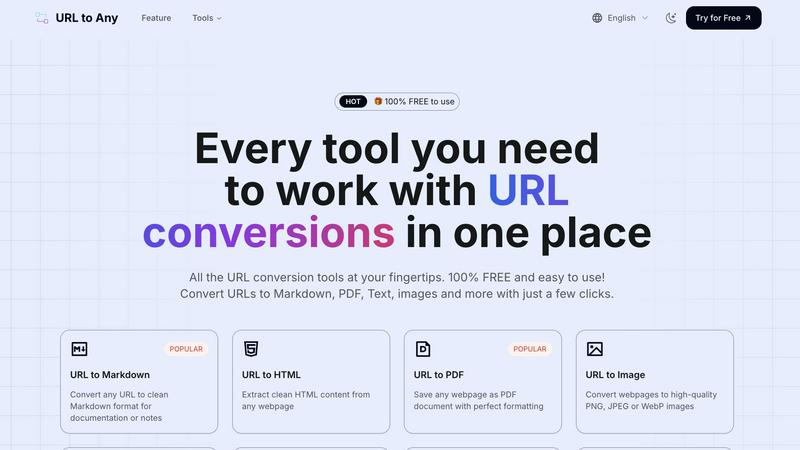
About URL to Any
URL to Any is a revolutionary, all-in-one web content conversion platform designed to continuously simplify and enhance how you interact with online information. It represents an iterative leap forward in productivity, transforming the static act of web browsing into a dynamic workflow of creation, extraction, and sharing. At its core, URL to Any empowers you to convert any webpage into a wide array of practical formats—including Markdown, PDF, HTML, high-quality images, QR codes, JSON, XML, and plain text—with unparalleled speed and simplicity. This tool is built for a diverse audience: content creators who need to edit and repurpose online material, developers requiring clean data extraction, researchers archiving sources, professionals saving reports, and anyone who needs to share web content without distractions. Its main value proposition is a powerful combination of ease, speed, and accessibility. The platform is 100% free, requires no registration, and delivers instant results through cloud processing, ensuring your data remains private and secure. URL to Any is more than a tool; it's an evolving ecosystem designed to adapt to your needs, making essential information readily available in the format that best suits your next step, today and as we improve tomorrow.
Features of URL to Any
Comprehensive Format Conversion
URL to Any provides a powerful suite of conversion tools at your fingertips. Go beyond basic saves and transform any URL into Markdown for documentation, PDFs with perfect formatting for archiving, high-quality PNG/JPEG images for presentations, and structured data formats like JSON and XML for development projects. This continuous expansion of output options ensures you always have the right format for the task at hand, streamlining your workflow through iterative improvement and versatile functionality.
Advanced Content Extraction & Utilities
The platform offers sophisticated extraction tools that go simple conversion. Instantly pull clean HTML, pure text, or all headings from a webpage. Extract and analyze meta tags for SEO insights, resolve URLs to IP addresses, or encode/decode text across 8+ formats. The integrated AI Summarizer leverages advanced technology to distill lengthy articles into concise summaries, representing our commitment to building smarter, more capable tools through continuous development cycles.
Instant, Cloud-Based Processing
Experience lightning-fast conversions without installing any software. Our optimized cloud processing engine handles everything securely in seconds. This means you can access URL to Any from any device, anywhere, and get well-formatted results instantly. Your data is processed on-the-fly and never stored on our servers, prioritizing your privacy and speed with every iterative update to our infrastructure.
Free & Accessible Toolkit
Every powerful tool within URL to Any is 100% free to use, reflecting our core philosophy of removing barriers to productivity. There is no registration, no hidden fees, and no complex setup. The intuitive interface makes converting web content effortless for users of all skill levels. We believe in providing immediate value and will continue to iterate on this model, ensuring global access to top-tier conversion tools without cost.
Use Cases of URL to Any
Content Creation & Research
Content creators, writers, and researchers can dramatically accelerate their workflow. Quickly convert online articles, blogs, or reference pages into clean Markdown or text for easy editing and note-taking. Save webpages as formatted PDFs to build a personal research library, or use the AI Summarizer to rapidly grasp the key points of long reports. This iterative process of capture, convert, and create turns web browsing into a seamless content production pipeline.
Web Development & Data Work
Developers and data analysts can use URL to Any to extract clean, structured data from websites efficiently. Convert webpage content into JSON or XML for APIs, data feeds, or analysis. Extract all URLs from a site for auditing or use the HTML extraction tool to get a clean code snippet. These tools simplify data scraping and preparation, continuously adapting to meet the technical demands of modern development projects.
Professional Archiving & Sharing
Professionals needing to archive web-based reports, legal notices, or project specifications can save them as perfectly formatted PDFs for official records. For sharing, quickly generate a high-quality image of a webpage for a presentation or create a QR code from a URL for easy distribution in print materials or emails. This ensures critical information is preserved and shared accurately, improving communication with every use.
Learning & Accessibility
Students and lifelong learners can use the tool to convert educational content into more accessible formats. Turn a tutorial page into a PDF for offline study, extract the text from a news article to paste into a translation tool, or generate an audio MP3 file from a webpage for listening on the go. URL to Any iteratively breaks down barriers, making online information more versatile and accessible for diverse learning styles and needs.
Frequently Asked Questions
Is URL to Any really free to use?
Yes, absolutely. URL to Any is 100% free to use. There are no hidden charges, no premium tiers, and no requirement to create an account or register. We are committed to providing powerful web conversion tools accessible to everyone, and we continuously improve the platform within this free model, ensuring sustainable value for all users.
What happens to the data from the URLs I convert?
Your privacy and data security are paramount. All processing is done securely in our cloud engine. The content from the URL you submit is processed in real-time to perform the conversion you request. We do not store your original URL, the webpage content, or your converted output on our servers after the process is complete, ensuring your information remains private.
How many URLs can I convert?
You can convert URLs as often as you need. While there might be reasonable usage limits in place to ensure system stability and fair access for all users, these are designed to be well above the needs of typical individual use. Our systems are iteratively optimized to handle high volume, processing over 1 million URLs monthly for our growing community of users.
Can I use URL to Any on my mobile device?
Yes, URL to Any is a web-based platform that is fully responsive and accessible from any device with a browser, including smartphones and tablets. The interface automatically adapts to your screen size, providing the same simple, intuitive experience and fast conversion speeds whether you are on a desktop, laptop, or mobile device.
Similar to URL to Any

AI transcription for voice notes, meetings, and audio files in 1,700 languages, with AI summaries and subtitle export and unlimited chat ai usage.

AI sales agent that finds qualified leads, runs outreach, follows up automatically, creates content, and helps book more meetings.

A working index of AI tools. We record what each one costs, what it connects to, and exactly where it stops being useful.

Find SaaS growth tools worth your time. Every tool is reviewed before it's listed, so the shortlist is already made for you.

Tired of chasing down the right AI tool across a dozen tabs? Tools Network brings them all together in one curated directory.


Skydive lets teams create AI agents that can complete real work inside the tools they already use.