
Melograph vs Sovideo
Side-by-side comparison to help you choose the right product.

Melograph turns your music tracks into eye-catching videos in minutes with customizable templates and easy exports.
Last updated: February 28, 2026

Sovideo generates professional AI images and videos using top models like Sora 2 and Veo 3.
Last updated: February 28, 2026
Visual Comparison
Melograph

Sovideo
Feature Comparison
Melograph
Intuitive Template Selection
Melograph offers a wide array of beautifully designed templates tailored to various music genres and vibes. Users can effortlessly select a template that resonates with their track, ensuring that their visuals align perfectly with their artistic vision.
Audio-Reactive Waveforms
With Melograph, users can upload their audio files and witness the waveform react in real time. This dynamic feature creates engaging visuals that respond to the music, captivating viewers and enhancing the overall listening experience.
Quick Customization Options
Customizing the visuals is a breeze with Melograph. Users can easily add their artist name, song title, and even upload logos or album covers on selected templates, making it simple to personalize the video and maintain brand consistency.
High-Quality Exports
Melograph ensures that every video export meets high-quality standards. Users can generate 1080p MP4 videos optimized for various platforms, ensuring clean text, smooth motion, and a professional presentation that is ready to post without any additional editing.
Sovideo
Unified AI Model Hub
Sovideo eliminates the need to juggle multiple subscriptions and interfaces by providing centralized access to leading AI models. Within one platform, you can generate videos with OpenAI's Sora 2 or Google's Veo 3, and create images with models like Seedream 4.5 and Nano Banana Pro. This integration allows for direct comparison, streamlined workflows, and the flexibility to choose the perfect tool for each creative task without ever leaving your workspace.
Browser-Based, Zero-Installation Workspace
Access professional-grade AI generation from any device with an internet connection. Sovideo operates entirely in the cloud through your web browser, requiring no technical setup, software downloads, or powerful local hardware. This frictionless access ensures you can create, edit, and iterate on your visual content from anywhere, at any time, turning every moment of inspiration into an opportunity for production.
Production-Ready Output Options
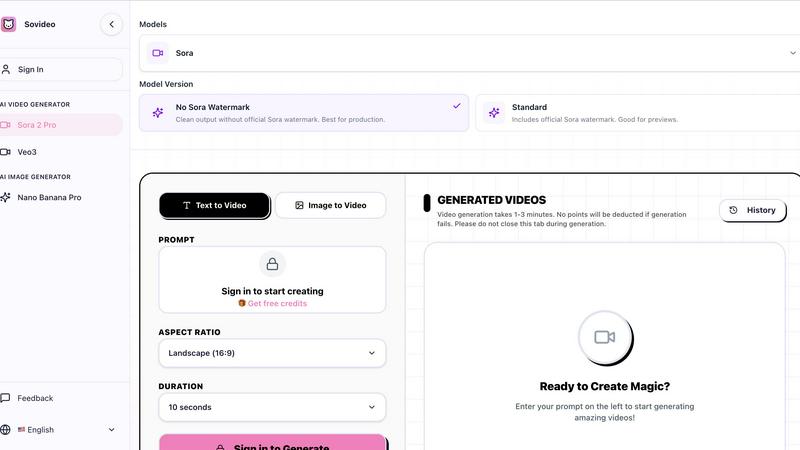
Sovideo provides control over the final quality of your creations. For video, you can select a "No Sora Watermark" version for clean, production-ready assets, or a "Standard" version with a watermark for internal previews and drafts. Combined with customizable parameters like aspect ratio (e.g., Landscape 16:9) and duration (10 or 15 seconds), you can tailor outputs to meet specific platform and professional requirements from the start.
Iterative Creative History & Refinement
Every generation is saved in your personal history, creating a living library of your creative journey. This feature is central to Sovideo's cyclical philosophy, allowing you to revisit past prompts and outputs, analyze results, and use them as a foundation for new iterations. Learn from each creation, tweak your prompts, and continuously improve your results, building upon your previous work to achieve higher quality and more precise outcomes over time.
Use Cases
Melograph
Indie Artist Promotion
Indie artists can leverage Melograph to create stunning visual content for their music releases. With quick exports and professional-looking visuals, they can captivate their audience on social media platforms, enhancing their promotional efforts.
Producer Showcases
Music producers can utilize Melograph to showcase their beats and tracks effectively. By pairing their audio with eye-catching visuals, they can attract potential collaborators and clients, making their work stand out in a competitive industry.
Label Marketing
Record labels can use Melograph to create cohesive visual branding for their artists. By consistently producing high-quality music videos, labels can enhance their marketing strategies and strengthen their artists' presence across digital platforms.
DJ Set Visuals
DJs can enhance their live performances by using Melograph to create dynamic visuals that accompany their sets. This not only elevates the audience experience but also provides a unique way to promote their music online.
Sovideo
Rapid Social Media Content Production
Creators and social media managers can generate a high volume of engaging, platform-specific visuals daily. From generating eye-catching video clips for TikTok or Reels to creating unique branded images for posts, Sovideo's speed and variety of models enable the rapid experimentation and iteration needed to discover viral trends and maintain a consistent, high-quality content calendar without a production team.
Prototyping and Storyboarding for Filmmakers
Independent filmmakers and studios can use Sovideo to visualize concepts quickly and cost-effectively. By generating dynamic video scenes from text prompts or evolving static images into short clips, creators can prototype sequences, experiment with cinematography styles, and build compelling storyboards. This iterative process allows for exploring countless creative directions before committing to expensive live-action production.
Marketing and Advertising Asset Creation
Marketing teams can produce a diverse array of professional marketing materials on demand. Generate product demonstration videos, create unique hero images for campaigns, or produce variations of ad creatives for A/B testing. Sovideo's unified platform allows for quick iteration based on performance data, enabling teams to refine and improve their visual assets in a continuous cycle to optimize engagement and conversion rates.
Educational and Explainer Content Development
Educators and content developers can transform complex ideas into clear, engaging visual explanations. Use the AI image generator to create detailed diagrams and illustrations, and the video generator to produce short, animated segments that break down processes. This iterative approach allows for refining the visuals based on learner feedback, ensuring the final educational content is as effective and understandable as possible.
Overview
About Melograph
Melograph is a cutting-edge web-based music visualizer designed for musicians and creators seeking to produce stunning visuals with minimal effort. This intuitive platform eliminates the complexities often associated with traditional video editing, allowing users to craft captivating audio-reactive videos in mere minutes. With a diverse selection of premium templates that cater to a range of styles—such as chill, cinematic, retro, and futuristic—Melograph empowers users to enhance their musical releases visually. Simply upload your audio track, enter your artist name and song title, and you are set to export a high-quality video ready for sharing. Ideal for indie artists, producers, labels, and DJs, Melograph streamlines the visual creation process, enabling musicians to focus on their craft while generating professional-looking content for social media and other platforms efficiently. Its core value proposition lies in the ability to produce consistent, eye-catching visuals that elevate any music project without consuming hours of editing time.
About Sovideo
Sovideo is the definitive all-in-one AI SaaS platform that unifies the future of visual creation. It seamlessly integrates the world's most powerful AI image and video generation models—including Sora 2, Sora 2 Pro, Veo 3, Nano Banana Pro, and Seedream 4.5—into a single, browser-accessible workspace. Designed for creators, marketers, and teams, Sovideo dismantles the traditional barriers of complex software and fragmented workflows. Its core mission is to transform raw ideas into professional-grade images and videos with unprecedented speed and simplicity, directly from your web browser with no installation required. The platform's true power lies in its cyclical and iterative approach to creation. Each generated asset is not an end point, but a foundational step for refinement and new exploration. This continuous loop of creation, evaluation, and improvement empowers users to scale their output, experiment fearlessly, and perpetually enhance the quality of their visual storytelling. By consolidating top-tier AI tools and fostering an iterative process, Sovideo dramatically reduces production time and cost, making high-end visual content creation accessible to all and built for the evolving demands of AI-driven narrative.
Frequently Asked Questions
Melograph FAQ
Do I need editing experience to use Melograph?
No, Melograph is designed for users of all skill levels. If you can select a template and enter text, you can create beautiful visuals easily.
Will this work for TikTok, Reels, or Shorts?
Absolutely! Melograph generates exports that are platform-friendly, making it perfect for sharing on TikTok, Instagram Reels, and YouTube Shorts.
Can I use it for multiple songs?
Yes, users can create visuals for multiple songs. Depending on your chosen pricing plan, you can generate several exports for different tracks.
Is Melograph web-based?
Yes, Melograph is entirely web-based, allowing you to create music visuals from any device with internet access, without the need for downloads or installations.
Sovideo FAQ
What AI models are available on Sovideo?
Sovideo provides access to a curated hub of state-of-the-art generative AI models. For video creation, this includes OpenAI's Sora 2 and Sora 2 Pro, and Google's Veo 3. For image generation, models like Seedream 4.5 and Nano Banana Pro are available. The platform integrates these models into a unified workflow, allowing you to leverage the unique strengths of each without managing separate accounts or interfaces.
Do I need to install any software to use Sovideo?
No installation is required. Sovideo is a fully cloud-based, Software-as-a-Service (SaaS) platform that runs directly in your web browser. You only need a stable internet connection to sign in and start creating. This ensures easy access from any device, whether it's a desktop computer, laptop, or tablet, with no performance burden on your local hardware.
How long does it take to generate a video?
Video generation times are typically between 1 to 3 minutes per clip. The platform is designed to handle the complex processing in the cloud. It is recommended not to close your browser tab during the generation process. Importantly, the system is built with reliability in mind; if a generation attempt fails, no credits or points will be deducted from your account.
Can I remove the Sora watermark from my videos?
Yes, Sovideo offers control over watermarking. When generating videos with Sora-based models, you can select the "No Sora Watermark" model version. This provides a clean output suitable for final production and public-facing content. The "Standard" version, which includes the official Sora watermark, remains available for internal previews, drafts, and non-commercial use cases.
Alternatives
Melograph Alternatives
Melograph is an innovative web-based music visualizer maker designed specifically for musicians and creators who wish to transform their audio tracks into captivating videos. It falls under the video creation category, allowing users to generate stunning visuals without the complexities typically associated with traditional video editing software. Users often seek alternatives to Melograph for various reasons, such as pricing concerns, feature requirements, or the need for specific platform compatibility. When exploring alternatives, it's essential to consider factors like ease of use, customization options, output quality, and the range of templates available to ensure that the chosen tool aligns well with creative goals and workflows.
Sovideo Alternatives
Sovideo is a comprehensive AI platform in the visual content creation category, specifically designed for generating professional-grade images and videos. It unifies top models like Sora 2 and Veo 3 in a single browser-based workspace, streamlining the creative process from idea to final asset. Users often explore alternatives for various reasons, including budget considerations, specific feature requirements not covered by a single tool, or a need for a different platform integration. The search for the right tool is a natural part of the iterative journey to find the perfect fit for one's evolving creative workflow. When evaluating other options, consider the core value of a unified workflow versus specialized single-use tools. Look at the quality and variety of AI models offered, the simplicity of the user interface, and how the platform supports a cyclical process of creation and refinement. The goal is to find a solution that grows with your ambitions, turning each project into a stepping stone for the next.