
Shrinkpad vs SparkPix
Side-by-side comparison to help you choose the right product.

Shrinkpad
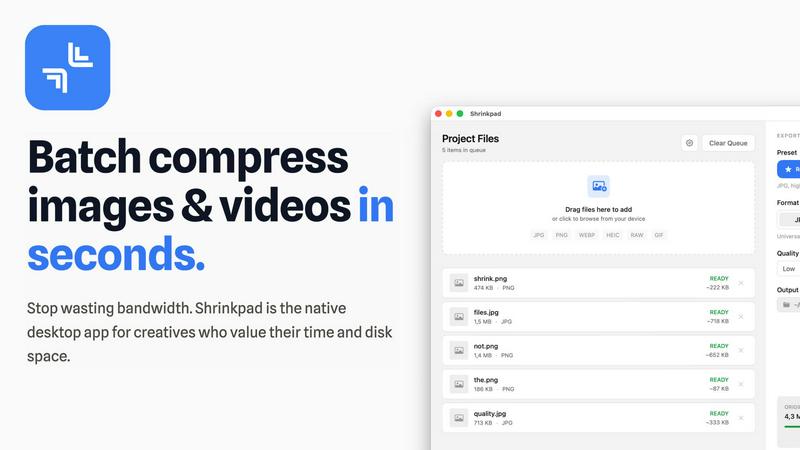
Shrinkpad continuously optimizes your images and videos in bulk, saving you time and space with every use.
Last updated: February 28, 2026

SparkPix
SparkPix is your AI photo editor that continuously improves your images by simply typing what you want to change.
Last updated: March 11, 2026
Visual Comparison
Shrinkpad
SparkPix

Feature Comparison
Shrinkpad
Intelligent Batch Processing
Shrinkpad revolutionizes asset management by allowing you to process thousands of images and videos in a single, seamless batch. Simply drag and drop an entire folder; the app automatically detects over 30 media formats, including RAW photos and 4K videos, and adds them to the queue. This eliminates the need to manually select individual files, saving hours of repetitive work and enabling a continuous, improved workflow where bulk optimization becomes a simple, one-click task.
Smart Quality Detection & Compression
Stop guessing compression settings. Shrinkpad employs an advanced algorithm that automatically analyzes the visual complexity of each image and video frame. It then applies the optimal compression ratio to drastically reduce file size—often by up to 90%—without introducing noticeable artifacts or compromising the visual fidelity you require for professional work. This smart, iterative analysis ensures the best possible result every time.
Complete Local Processing & Privacy
In an era of cloud dependencies, Shrinkpad champions a privacy-first philosophy. All compression happens locally on your Mac, leveraging the full power of Apple Silicon for lightning-fast performance. Your original files, project assets, and sensitive client work are never uploaded to a remote server. This commitment to local processing provides peace of mind and represents a fundamental improvement in how creative tools handle your data.
Advanced Workflow Utilities
Beyond core compression, Shrinkpad includes powerful features designed for professional, iterative workflows. It offers automatic renaming conventions, processes files within subfolders to maintain your project structure, and can strip metadata for cleaner, web-ready assets. The ability to handle mixed media batches—photos and videos together—further refines and accelerates your optimization pipeline from start to finish.
SparkPix
AI Photo Editor with Text Commands
This is the cornerstone feature of SparkPix. Instead of navigating menus and sliders, users simply type instructions like "remove the tourist in the background" or "enhance colors and sharpen details." The AI interprets these natural language prompts and applies precise, complex edits automatically. This creates a fast, iterative workflow where you can continuously refine the image with follow-up commands, making professional editing an intuitive and evolving process accessible to everyone.
One-Click Background Remover
SparkPix offers an instant, high-quality background removal tool that works on a wide range of subjects, from clean portraits to complex product shots and detailed scenes. With a single click, the AI intelligently isolates the subject, delivering a transparent background perfect for creating professional thumbnails, marketing materials, or fun composites. This tool is constantly refined to handle finer details like hair and complex edges more accurately with each use.
AI Photo Restoration & Enhancement
This powerful dual-function feature breathes new life into images. The restoration AI can repair old, damaged photos by removing scratches, tears, and stains while correcting fading to restore original details. Simultaneously, the enhancement engine can sharpen blurry images, reduce digital noise, upscale resolution, and boost colors in modern photos. It represents a cycle of renewal, transforming both historical treasures and recent snapshots into high-quality visuals.
AI Image Generator & Style Transfer
SparkPix empowers creation and artistic reinvention. The AI Image Generator produces unique, high-resolution visuals from text descriptions. Complementing this, the Style Transfer feature can transform any uploaded photo into various artistic renditions, such as anime, oil painting, or pencil sketch. This allows for endless creative experimentation, where you can generate an image and then iteratively apply different styles to achieve your exact vision.
Use Cases
Shrinkpad
Optimizing Web and App Assets
Developers and web designers can use Shrinkpad to batch-compress entire directories of interface elements, product images, and promotional videos. This drastically reduces bundle sizes and improves website load times, with users reporting faster Largest Contentful Paint (LCP) scores. It's an essential, iterative step in the development cycle to enhance user experience and performance metrics continuously.
Managing Photographer and Videographer Libraries
Photographers and videographers dealing with massive libraries of high-resolution RAW files and 4K footage can use Shrinkpad to create optimized, shareable versions without sacrificing quality. Quickly prepare client galleries, social media previews, or archive projects to free up terabytes of storage, allowing for a more efficient and ongoing management of your creative portfolio.
Streamlining Design-to-Export Workflows
Designers can export full sets of assets from tools like Figma or Photoshop at 2x or 4x resolution and then use Shrinkpad's folder mode to batch-optimize and auto-rename everything in one go. This removes a significant bottleneck, turning a manual, error-prone process into an automated, iterative step that saves countless hours and ensures consistently delivered assets.
Preparing Content for Distribution
Content creators, marketers, and social media managers can process weeks' worth of content in minutes. Shrinkpad makes it easy to compress videos for email campaigns, reduce image sizes for faster website uploads, and prepare media for various platforms without worrying about format compatibility or uploading sensitive content to third-party websites.
SparkPix
E-commerce & Product Photography
Online sellers can use SparkPix to generate professional product mockups, remove backgrounds for clean white-background listings, and enhance image quality to make products more appealing. The AI can create scenes of a person holding a product or display an app interface on a phone mockup, providing high-quality, customizable visuals for Amazon, Shopify, or social media shops without expensive photoshoots.
Family History & Photo Restoration
Individuals looking to preserve memories can use SparkPix to restore cherished old family photographs. The AI can colorize black and white photos, repair physical damage like scratches and tears, and enhance faded details. This cyclical process of recovery helps bring historical moments back to life, making it an invaluable tool for genealogy projects and digitizing family archives.
Social Media & Personal Branding
Content creators, influencers, and professionals can elevate their online presence. SparkPix is perfect for creating eye-catching profile pictures, removing unwanted objects or photobombers from Instagram shots, applying unique artistic filters to posts, and designing custom YouTube thumbnails by changing backgrounds. It supports a continuous cycle of content improvement and brand refinement.
Professional Headshots & Official Documents
Users can quickly generate compliant passport photos, visa photos, or professional LinkedIn headshots. By uploading a picture and using prompts for formal attire and a solid-color background, SparkPix's AI can produce a studio-quality image that meets official requirements, saving time and money compared to visiting a photographer or pharmacy photo service.
Pricing Comparison
Shrinkpad
Shrinkpad offers simple, one-time payment pricing with no subscriptions. You own the license forever. The Free Starter plan provides essential tools for casual use. The Personal license, at a one-time cost of $14, is the best value for individual creators, unlocking unlimited batch processing, all file formats (including RAW and HEIC), mixed image & video compression, and no file size limits for one device. The Team license, at a one-time cost of $35, includes everything in Personal plus licenses for up to 10 devices and priority support, making it ideal for studios and collaborative environments.
SparkPix
SparkPix operates on a credit-based system designed to be accessible. You can start completely for free by signing up, which grants you 5 credits with no credit card required. For users who need more, paid plans begin at $9.99, which provides a substantial bundle of 350 credits to support ongoing projects and continuous creative exploration. This flexible model ensures you only pay for what you use while the platform iteratively advances.
Overview
About Shrinkpad
Shrinkpad is the definitive native macOS application for batch compression, engineered for the modern creative who demands both speed and quality. It is a powerful, privacy-first tool that allows photographers, designers, developers, and content creators to compress hundreds of images and videos simultaneously, directly on their Mac. The core value proposition is a continuous cycle of improvement: reclaiming precious disk space, accelerating website and application performance, and streamlining digital workflows without the tedious, manual effort typically involved. By processing files locally, Shrinkpad ensures your sensitive assets never leave your device, eliminating the security risks and bandwidth waste associated with cloud-based tools. It intelligently analyzes visual complexity to apply the perfect compression, achieving reductions of up to 90% while preserving perceptual quality. This iterative approach to asset optimization means you can work faster, store more, and deliver better-performing projects, establishing a new, more efficient standard for your creative process.
About SparkPix
SparkPix is a revolutionary web-based AI photo editor that democratizes professional-grade image manipulation by replacing complex software with simple text commands. It is designed for anyone who wants to edit photos—from complete beginners and social media enthusiasts to e-commerce sellers and creative professionals—without needing to learn intricate tools like Photoshop. The core value proposition is profound simplicity: you describe the change you want to see, and the AI executes it in under 30 seconds. This iterative, conversational approach to editing allows for continuous refinement; you can build upon each edit, tweaking the results until they are perfect. SparkPix embodies a philosophy of cyclical improvement, both for your photos and your creative workflow, making advanced techniques like background removal, photo restoration, and artistic style transfer accessible in a single, unified platform. With a free starting tier and seamless operation across desktop and mobile browsers, it removes all barriers to entry, empowering users to transform their visual content instantly and evolve their skills with every prompt.
Frequently Asked Questions
Shrinkpad FAQ
Can I use Shrinkpad for free?
Yes, Shrinkpad offers a Free Starter plan that includes standard compression for common formats like JPG and PNG, with a limit of 10 files per batch and a maximum 1GB file size. This allows you to test the core functionality and experience the iterative improvement in your workflow before upgrading to unlock unlimited processing and advanced features.
What file formats does Shrinkpad support?
Shrinkpad supports a wide range of over 30 image and video formats. This includes common types like JPG, PNG, MP4, and MOV, as well as professional formats such as WEBP, AVIF, HEIC, and RAW camera files. Its smart detection automatically identifies and optimally compresses each file type within a mixed batch.
Does Shrinkpad support video compression?
Absolutely. Shrinkpad is a powerful batch tool for both images and videos. It supports major video formats like MP4 and MOV, applying efficient compression to reduce file sizes significantly—often by 65% or more—while maintaining visual quality, making it perfect for optimizing demo reels, promotional content, and video libraries.
How many files can I process at once?
With the Personal or Team license, you can process an unlimited number of files in a single batch. Unlike web-based tools that often crash with large queues, Shrinkpad is built as a native desktop app to handle thousands of assets with ease, enabling true iterative, large-scale optimization projects without limits.
SparkPix FAQ
Is SparkPix really free to use?
Yes, SparkPix offers a free tier to get started. New users receive 5 free credits upon sign-up, with no credit card required. This allows you to test several AI edits and experience the platform's core capabilities. Additional credits are available through affordable paid plans, ensuring you can continue your creative work and iterative improvements.
What kind of edits can I do with text prompts?
You can perform a vast array of edits by typing instructions. Common examples include removing objects or people, changing backgrounds, restoring damaged photos, colorizing black and white images, enhancing sharpness and colors, converting photos into different art styles (like anime or oil painting), and even generating entirely new images from descriptions. The key is to be specific in your prompts for the best results.
Do I need to download any software?
No, SparkPix is entirely web-based. It works directly in your browser on any device, including desktop computers, iPhones, and Android phones. There is no software to download or install, allowing for instant access and a seamless, evolving editing experience across all your devices.
How does the credit system work?
Each AI operation, such as generating an edit from a text prompt or using a tool like background removal, consumes a certain number of credits. The free plan provides initial credits to try the service. Paid plans offer larger credit packs for extended use. This system supports a sustainable cycle of development, allowing us to continuously improve the AI models and features for all users.
Alternatives
Shrinkpad Alternatives
Shrinkpad is a dedicated batch compression tool for macOS, operating within the image and video optimization category. It streamlines workflows by allowing users to process hundreds of files locally, ensuring privacy and significant storage savings without quality loss. Users often explore alternatives for various reasons, such as budget constraints, needing support for different operating systems, or seeking a different balance between advanced features and simplicity. The search for the right tool is a natural part of refining one's digital toolkit. When evaluating alternatives, consider core needs like platform compatibility, the range of supported formats, and the importance of local versus cloud processing. The goal is to find a solution that integrates seamlessly into your existing workflow, enabling continuous improvement in how you manage media assets.
SparkPix Alternatives
SparkPix is a web-based AI photo editor that allows you to edit images simply by typing text commands. It falls into the category of online image and photo editing tools, designed to make advanced photo manipulation accessible to everyone without requiring software downloads or professional skills. Users often explore alternatives to find a tool that better fits their specific needs. This could be due to budget constraints, a need for different features like advanced layer editing, a preference for downloadable software, or simply a desire to compare options in a competitive market. The right choice depends heavily on your primary use case and workflow. When evaluating other options, consider the core AI capabilities that matter to you, such as background removal or photo restoration quality. Also, assess the pricing model, whether it's credit-based or subscription-based, and ensure the platform is compatible with your devices. Security for your uploaded images and the overall user experience are also crucial factors to weigh in your decision.