
Cool PFP vs Shrinkpad
Side-by-side comparison to help you choose the right product.

Cool PFP
Elevate your social profiles with free HD anime, cute, funny, and aesthetic PFPs ready for instant download.
Last updated: February 28, 2026

Shrinkpad
Shrinkpad continuously optimizes your images and videos in bulk, saving you time and space with every use.
Last updated: February 28, 2026
Visual Comparison
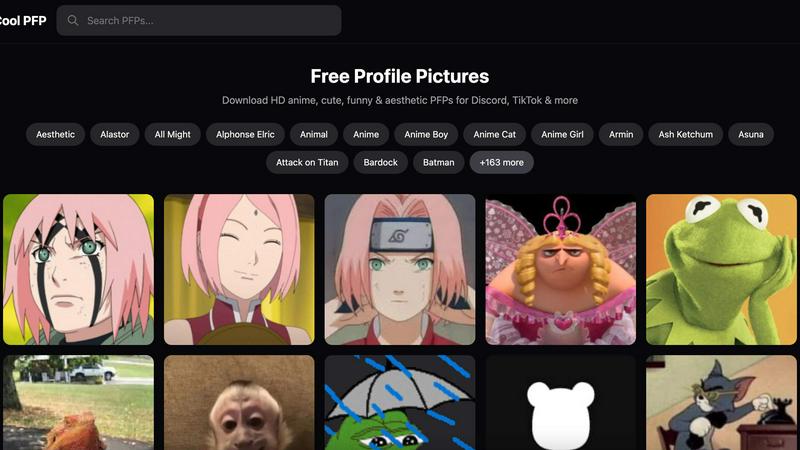
Cool PFP
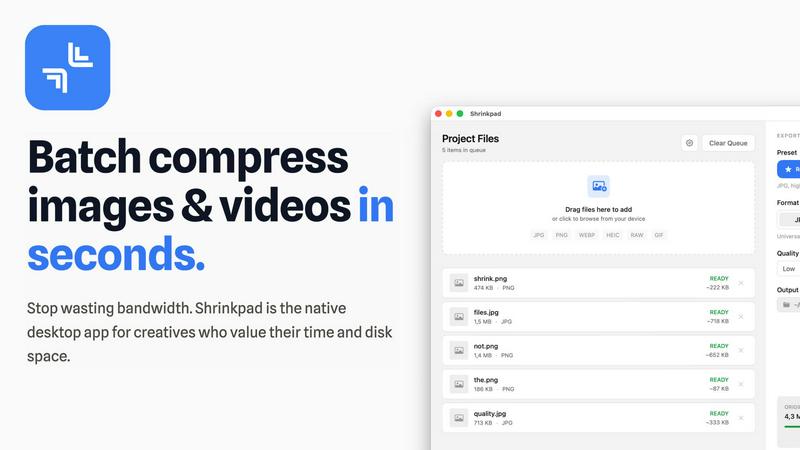
Shrinkpad
Feature Comparison
Cool PFP
Vast Library of Styles
Cool PFP offers an extensive collection of profile pictures, featuring categories that range from anime to cute, funny, and aesthetic. This diversity ensures that every user can find a PFP that aligns with their personality and interests.
High-Definition Downloads
All profile pictures available on Cool PFP are in high definition. Users can download these stunning images to ensure their profiles look sharp and visually appealing across various platforms.
No Signup Required
One of the standout features of Cool PFP is its accessibility. Users can browse and download images without the hassle of signing up, allowing for a seamless and immediate experience.
Regular Updates
Cool PFP continually refreshes its collection by adding new profile pictures regularly. This feature keeps the platform dynamic and encourages users to return frequently to discover the latest trends and character designs.
Shrinkpad
Intelligent Batch Processing
Shrinkpad revolutionizes asset management by allowing you to process thousands of images and videos in a single, seamless batch. Simply drag and drop an entire folder; the app automatically detects over 30 media formats, including RAW photos and 4K videos, and adds them to the queue. This eliminates the need to manually select individual files, saving hours of repetitive work and enabling a continuous, improved workflow where bulk optimization becomes a simple, one-click task.
Smart Quality Detection & Compression
Stop guessing compression settings. Shrinkpad employs an advanced algorithm that automatically analyzes the visual complexity of each image and video frame. It then applies the optimal compression ratio to drastically reduce file size—often by up to 90%—without introducing noticeable artifacts or compromising the visual fidelity you require for professional work. This smart, iterative analysis ensures the best possible result every time.
Complete Local Processing & Privacy
In an era of cloud dependencies, Shrinkpad champions a privacy-first philosophy. All compression happens locally on your Mac, leveraging the full power of Apple Silicon for lightning-fast performance. Your original files, project assets, and sensitive client work are never uploaded to a remote server. This commitment to local processing provides peace of mind and represents a fundamental improvement in how creative tools handle your data.
Advanced Workflow Utilities
Beyond core compression, Shrinkpad includes powerful features designed for professional, iterative workflows. It offers automatic renaming conventions, processes files within subfolders to maintain your project structure, and can strip metadata for cleaner, web-ready assets. The ability to handle mixed media batches—photos and videos together—further refines and accelerates your optimization pipeline from start to finish.
Use Cases
Cool PFP
Social Media Profiles
Users can enhance their social media presence by selecting unique profile pictures from Cool PFP, allowing them to stand out on platforms like Instagram and TikTok, where visual appeal is key.
Gaming Avatars
Gamers can find the perfect PFP to represent their online personas in games like Discord and Twitch. Whether it's an anime character or a funny meme, Cool PFP has something for every gaming enthusiast.
Personal Branding
For individuals looking to establish a personal brand, a distinctive profile picture can make a significant impact. Cool PFP provides a variety of options that reflect personal styles and values, making branding efforts more effective.
Creative Projects
Cool PFP is not just for personal use; it is also an excellent resource for artists and content creators who need striking visuals for their projects. The platform's wide range of styles can serve as inspiration or direct visual assets for various creative endeavors.
Shrinkpad
Optimizing Web and App Assets
Developers and web designers can use Shrinkpad to batch-compress entire directories of interface elements, product images, and promotional videos. This drastically reduces bundle sizes and improves website load times, with users reporting faster Largest Contentful Paint (LCP) scores. It's an essential, iterative step in the development cycle to enhance user experience and performance metrics continuously.
Managing Photographer and Videographer Libraries
Photographers and videographers dealing with massive libraries of high-resolution RAW files and 4K footage can use Shrinkpad to create optimized, shareable versions without sacrificing quality. Quickly prepare client galleries, social media previews, or archive projects to free up terabytes of storage, allowing for a more efficient and ongoing management of your creative portfolio.
Streamlining Design-to-Export Workflows
Designers can export full sets of assets from tools like Figma or Photoshop at 2x or 4x resolution and then use Shrinkpad's folder mode to batch-optimize and auto-rename everything in one go. This removes a significant bottleneck, turning a manual, error-prone process into an automated, iterative step that saves countless hours and ensures consistently delivered assets.
Preparing Content for Distribution
Content creators, marketers, and social media managers can process weeks' worth of content in minutes. Shrinkpad makes it easy to compress videos for email campaigns, reduce image sizes for faster website uploads, and prepare media for various platforms without worrying about format compatibility or uploading sensitive content to third-party websites.
Overview
About Cool PFP
Cool PFP is the ultimate online destination for individuals seeking to elevate their digital identity through captivating profile pictures (PFPs). With an extensive library of free profile pictures tailored to various styles, Cool PFP caters to a diverse audience, including gamers, social media influencers, and anyone looking to express their unique personality. The platform features a wide array of categories such as anime, cute, funny, and aesthetic visuals, ensuring users can find the perfect PFP for their platforms, whether it's Discord, TikTok, Instagram, or more. One of the main advantages of Cool PFP is its user-friendly experience, allowing instant access to high-definition images without any signup requirements. Each week, new designs are added, reflecting the latest trends and characters, making it easy for users to stay up-to-date with popular culture. At Cool PFP, finding your next favorite profile picture is not just simple; it’s an enjoyable journey of self-expression.
About Shrinkpad
Shrinkpad is the definitive native macOS application for batch compression, engineered for the modern creative who demands both speed and quality. It is a powerful, privacy-first tool that allows photographers, designers, developers, and content creators to compress hundreds of images and videos simultaneously, directly on their Mac. The core value proposition is a continuous cycle of improvement: reclaiming precious disk space, accelerating website and application performance, and streamlining digital workflows without the tedious, manual effort typically involved. By processing files locally, Shrinkpad ensures your sensitive assets never leave your device, eliminating the security risks and bandwidth waste associated with cloud-based tools. It intelligently analyzes visual complexity to apply the perfect compression, achieving reductions of up to 90% while preserving perceptual quality. This iterative approach to asset optimization means you can work faster, store more, and deliver better-performing projects, establishing a new, more efficient standard for your creative process.
Frequently Asked Questions
Cool PFP FAQ
What types of profile pictures are available on Cool PFP?
Cool PFP features a wide range of profile pictures, including anime, cute, funny, and aesthetic styles, catering to a diverse audience with varying tastes.
Do I need to create an account to download images?
No, Cool PFP allows users to browse and download high-definition profile pictures without any signup required, making the process quick and hassle-free.
How often is the collection updated?
Cool PFP regularly updates its collection to include the latest trends and styles, ensuring that users have access to fresh and relevant profile picture options.
Can I use these profile pictures for commercial purposes?
While Cool PFP provides free profile pictures for personal use, it's advisable to check specific licensing terms for commercial use to ensure compliance with copyright regulations.
Shrinkpad FAQ
Can I use Shrinkpad for free?
Yes, Shrinkpad offers a Free Starter plan that includes standard compression for common formats like JPG and PNG, with a limit of 10 files per batch and a maximum 1GB file size. This allows you to test the core functionality and experience the iterative improvement in your workflow before upgrading to unlock unlimited processing and advanced features.
What file formats does Shrinkpad support?
Shrinkpad supports a wide range of over 30 image and video formats. This includes common types like JPG, PNG, MP4, and MOV, as well as professional formats such as WEBP, AVIF, HEIC, and RAW camera files. Its smart detection automatically identifies and optimally compresses each file type within a mixed batch.
Does Shrinkpad support video compression?
Absolutely. Shrinkpad is a powerful batch tool for both images and videos. It supports major video formats like MP4 and MOV, applying efficient compression to reduce file sizes significantly—often by 65% or more—while maintaining visual quality, making it perfect for optimizing demo reels, promotional content, and video libraries.
How many files can I process at once?
With the Personal or Team license, you can process an unlimited number of files in a single batch. Unlike web-based tools that often crash with large queues, Shrinkpad is built as a native desktop app to handle thousands of assets with ease, enabling true iterative, large-scale optimization projects without limits.
Alternatives
Cool PFP Alternatives
Cool PFP is a dynamic platform that caters to individuals seeking to enhance their online identity with captivating profile pictures. It falls under the image and photo category, offering a diverse library of high-definition profile pictures that span various styles such as anime, cute, funny, and aesthetic visuals. Users flock to Cool PFP for its user-friendly experience and extensive collection, but they may also seek alternatives for reasons such as additional features, specific platform compatibility, or unique artistic styles. When searching for alternatives to Cool PFP, it's crucial to consider factors such as the diversity of available images, the resolution of downloads, and the overall user experience. Users often look for platforms that provide similar or enhanced features, including easy navigation, a wide array of themes, and up-to-date collections. Prioritizing these elements ensures that you find a suitable alternative that meets your profile picture needs while allowing for personal expression across digital platforms.
Shrinkpad Alternatives
Shrinkpad is a dedicated batch compression tool for macOS, operating within the image and video optimization category. It streamlines workflows by allowing users to process hundreds of files locally, ensuring privacy and significant storage savings without quality loss. Users often explore alternatives for various reasons, such as budget constraints, needing support for different operating systems, or seeking a different balance between advanced features and simplicity. The search for the right tool is a natural part of refining one's digital toolkit. When evaluating alternatives, consider core needs like platform compatibility, the range of supported formats, and the importance of local versus cloud processing. The goal is to find a solution that integrates seamlessly into your existing workflow, enabling continuous improvement in how you manage media assets.