
Postomator vs SocialCal
Side-by-side comparison to help you choose the right product.

Postomator
Postomator effortlessly transforms your existing content into engaging LinkedIn posts, enhancing your professional.
Last updated: February 28, 2026

SocialCal
SocialCal effortlessly posts your content across ten platforms with one click, saving you valuable time each week.
Last updated: February 28, 2026
Visual Comparison
Postomator

SocialCal
Feature Comparison
Postomator
Content Repurposing
Postomator allows users to repurpose existing content effortlessly. By simply pasting a URL of your previously published articles, blog posts, or newsletters, you can generate multiple LinkedIn posts that reflect your unique voice and style.
AI Writing Assistant
The AI writing assistant is designed to sharpen your content rather than replace it. Users can select any text and receive instant suggestions for improvement, making their ideas clearer, more concise, and impactful in seconds.
Scheduling and Publishing
With Postomator, you can schedule your posts to be published at optimal times for your audience. This feature enables you to batch-create content, allowing you to focus on writing when you are most productive while maintaining a consistent presence on LinkedIn throughout the week.
Insightful Post Ideas
Postomator analyzes your content and generates post ideas from various angles. This feature helps users overcome writer's block by providing creative suggestions that resonate with their audience, making it easier to engage and connect.
SocialCal
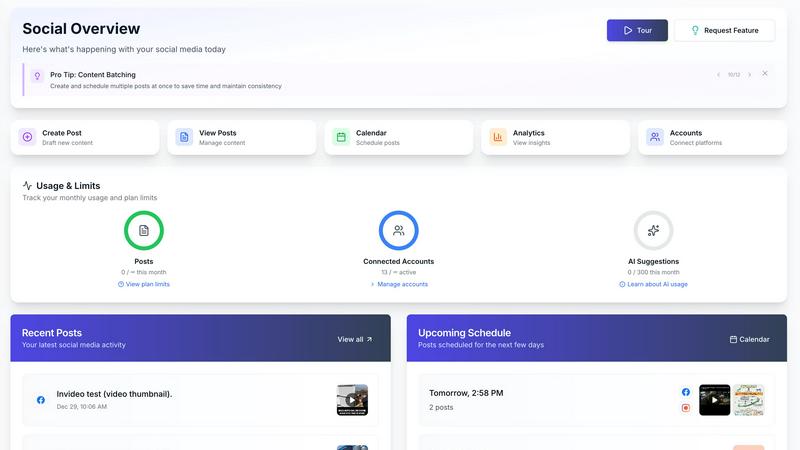
Multi-Platform Publishing
SocialCal empowers users to post content across 10 different platforms with just one click. This feature eliminates the repetitive task of logging into various accounts and copying and pasting content, allowing you to maximize your reach effortlessly.
Smart Scheduling
Harness the power of Smart Scheduling to time your posts for optimal engagement. This feature analyzes audience activity and suggests the best times to publish, ensuring your content is seen by as many people as possible when they are most active.
AI Caption Writer
With the AI Caption Writer, users can generate captions in multiple tones tailored to their audience. This feature saves time and enhances creativity, allowing you to maintain your brand voice while adapting to different platforms and audience preferences.
Analytics Dashboard
The Analytics Dashboard provides comprehensive insights into your social media performance across all connected platforms. With real-time metrics and reports, you can track engagement, reach, and audience growth, enabling data-driven decisions to refine your strategy.
Use Cases
Postomator
For Consultants
Consultants can leverage Postomator to transform their detailed proposals and case studies into engaging LinkedIn posts. This allows them to showcase their expertise while attracting potential clients and building their professional network.
For Founders and CEOs
Founders and CEOs often have valuable insights from their blogs and talks. Postomator helps them repurpose this content into concise LinkedIn posts, ensuring that their expertise reaches a wider audience and enhances their thought leadership.
For Marketers
Marketers who create content daily for clients can use Postomator to finally focus on their own brand. By repurposing their own articles, newsletters, and marketing materials, they can maintain a consistent presence on LinkedIn without starting from scratch.
For Content Creators
Content creators can utilize Postomator to convert their video transcripts, podcasts, and other materials into impactful LinkedIn posts. This feature allows them to reach a broader audience and engage with their community effectively.
SocialCal
Managing Client Accounts
SocialCal is perfect for agencies and freelancers managing multiple clients. The Client Profiles feature allows you to oversee various accounts from a single dashboard, streamlining your workflow and making it easier to deliver consistent results across different brands.
Content Planning for Creators
For content creators, SocialCal offers a robust planning tool that integrates seamlessly with your creative process. Use the Drag & Drop Calendar to schedule posts visually, helping you curate your content and maintain a cohesive online presence.
Social Media Strategy Optimization
Businesses looking to improve their social media engagement can leverage SocialCal's Analytics Dashboard to assess performance. By analyzing metrics, you can identify what works best for your audience and continuously refine your content strategy for better results.
Time Management for Solopreneurs
Solopreneurs can benefit from SocialCal by saving valuable time. With Automated Posting and Smart Scheduling, you can focus on creating high-quality content instead of spending hours managing posts across various platforms, thus allowing more time for other essential business tasks.
Overview
About Postomator
Postomator is an innovative LinkedIn scheduling and AI writing tool tailored for busy professionals, including consultants, founders, and marketers. It alleviates the stress of content creation by providing a streamlined platform where users can draft, refine, and schedule their LinkedIn posts with ease. The core value proposition of Postomator lies in its ability to help users write better posts faster, ensuring they maintain a consistent online presence without the burden of overthinking each piece. With its robust AI writing assistant, users can effortlessly enhance their messages, adjust tones, and receive relevant suggestions when encountering writer's block. Ultimately, Postomator enables professionals to share genuine insights, foster authentic connections, and generate leads through thoughtful content creation—without sacrificing valuable time.
About SocialCal
SocialCal is the ultimate social media management platform designed specifically for modern creators, solopreneurs, and agile teams. It simplifies the daunting task of juggling multiple apps for content management by providing a unified and intelligent workflow. With SocialCal, users can seamlessly integrate content creation, cross-platform scheduling, and performance analytics into one powerful dashboard, significantly enhancing productivity and minimizing effort. The platform is tailored for those who recognize that social media success is not about working harder, but about working smarter through iterative optimization. Whether you are managing a personal brand or multiple client accounts, SocialCal eradicates the hassle of switching between different platforms, tracking metrics manually, and copying content. Instead, it serves as your comprehensive command center for planning, creating, scheduling, and analyzing, promoting a continuous cycle of posting, learning, and fine-tuning strategies for maximum engagement and growth.
Frequently Asked Questions
Postomator FAQ
What type of content can I repurpose with Postomator?
You can repurpose various types of content, including articles, blog posts, newsletters, and even video transcripts. Postomator turns these into multiple LinkedIn posts, making content creation more efficient.
How does the AI writing assistant work?
The AI writing assistant provides instant suggestions when you select any text. It can help make your writing shorter, punchier, or clearer, ensuring that your ideas are polished and resonate with your audience.
Can I schedule posts for specific times?
Yes, Postomator allows you to schedule your posts to be published at times when your audience is most active. This feature helps you maintain a consistent online presence without daily effort.
Is Postomator suitable for beginners?
Absolutely! Postomator is designed for busy professionals of all levels. Its user-friendly interface and AI-assisted features make it easy for anyone to enhance their LinkedIn content and engage with their audience effectively.
SocialCal FAQ
How does SocialCal simplify social media management?
SocialCal consolidates multiple social media functions into one platform, allowing users to create, schedule, and analyze content without switching between different apps. This streamlining saves time and reduces complexity.
Can I manage multiple client accounts with SocialCal?
Yes, SocialCal is designed with Client Profiles that enable users to manage multiple accounts from a single dashboard, making it ideal for agencies and freelancers who juggle various client responsibilities.
Is SocialCal user-friendly for beginners?
Absolutely. SocialCal features a clean, creator-first dashboard that requires minimal setup time. Users can start scheduling and managing their content within minutes of signing up, with no overwhelming learning curve.
What platforms does SocialCal support?
SocialCal supports a variety of major platforms, including Instagram, X (Twitter), Facebook, LinkedIn, YouTube, TikTok, Threads, Bluesky, Pinterest, and Telegram, allowing users to reach their audience wherever they are.
Alternatives
Postomator Alternatives
Postomator is a specialized tool designed for busy professionals, enabling them to craft and schedule authentic LinkedIn posts with ease. As a social media management solution, it streamlines the content creation process, empowering users to enhance their professional presence without overwhelming themselves. Many users seek alternatives to Postomator for various reasons, including pricing concerns, feature sets that may not align with their specific needs, or compatibility with other platforms. When considering an alternative, it’s essential to evaluate factors such as the tool's writing capabilities, scheduling options, user interface, and overall ease of use to ensure it meets your content creation goals and enhances your engagement on social media.
SocialCal Alternatives
SocialCal is a cutting-edge social media management platform designed for modern creators, solopreneurs, and small teams. By centralizing content creation, scheduling, and analytics into one cohesive dashboard, SocialCal addresses the common struggles of juggling multiple social media accounts and tools. Users often seek alternatives due to varying needs such as pricing, specific features, or integration capabilities with different platforms. When choosing an alternative, consider factors such as the range of supported social media platforms, ease of use, analytics features, and the ability to streamline your workflow. Look for a solution that aligns with your content strategy and enhances your productivity, enabling you to engage effectively with your audience while optimizing your time management.