
One More Shot AI vs Tool.Video
Side-by-side comparison to help you choose the right product.

One More Shot AI
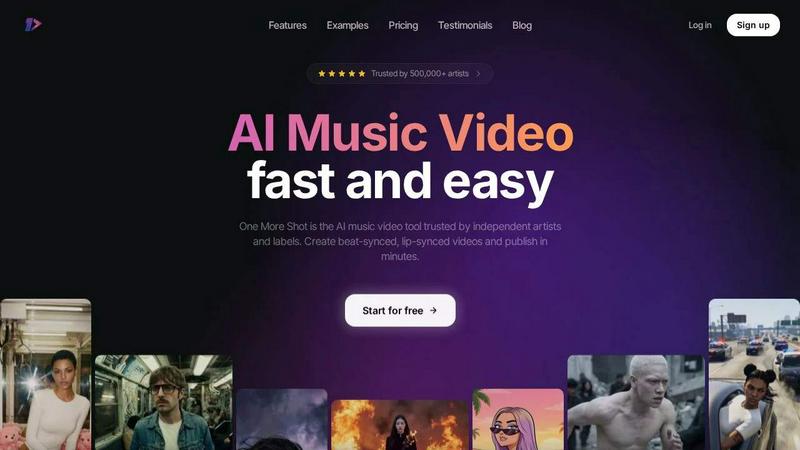
One More Shot AI continuously refines your music into professional, perfectly synced videos, making every release better than the last.
Last updated: April 4, 2026

Tool.Video
Tool.Video is your all-in-one AI toolkit for effortless video creation, music, and stunning visuals in one seamless.
Last updated: March 1, 2026
Visual Comparison
One More Shot AI
Tool.Video

Feature Comparison
One More Shot AI
AI Artist & Identity Consistency
Create a virtual, consistent artist identity from a single photo or description. This feature ensures your character appears recognizable and uniform across all scenes and videos, which is crucial for building a strong, reliable brand presence across social media and music platforms. It provides the foundational visual anchor for all your content, evolving and improving with each project you create.
Auto Video Generation
Functioning as your AI production crew, this feature handles the heavy lifting. Simply input your song and a reference image, and the AI agents analyze the audio to automatically generate a complete, rhythmically synced music video. It’s designed for speed and ease, delivering impressive results in minutes and establishing a powerful first draft that you can then refine and improve upon iteratively.
Precise Project Editing Mode
For creators who demand granular control, Project Mode offers frame-by-frame and shot-by-shot editing capabilities. Start from scratch or deconstruct an auto-generated video to modify individual scenes, adjust timing, and fine-tune visuals. This level of precision supports a cyclical creative process, where you can continuously tweak and enhance your video until it matches your exact vision.
Top-Tier AI Lip-Sync (Seedance 2.0)
The platform hosts advanced lip-syncing technology, including the latest Seedance 2.0 model, to ensure vocal performances look completely natural and perfectly synchronized with the audio track. This continuous investment in the best available models guarantees that singing scenes are convincing and professional, elevating the overall quality and believability of your AI-generated music videos with every update.
Tool.Video
AI Video Generation
Harness the power of Sora 2, an advanced text-to-video AI model, to create realistic videos from text prompts. With natural motion and stunning visuals, this feature allows creators to bring their ideas to life seamlessly.
AI Image Generation
Utilize Nano Banana Pro for high-quality image generation, offering both text-to-image and image-to-image modes. This feature enables users to create captivating visuals in seconds, enhancing their projects with stunning graphics.
AI Music Generation
With Suno 5, Tool.Video provides professional-grade music generation capabilities. Users can compose entire songs, complete with lyrics and melodies, or generate customized soundtracks to elevate their video content.
Video Utilities
Tool.Video includes essential video utilities such as a thumbnail generator, watermark adder, and video trimmer. These tools allow for quick edits and enhancements, ensuring that each video meets professional standards.
Use Cases
One More Shot AI
Independent Artist Music Videos
Independent musicians and bands can produce professional, attention-grabbing music videos to accompany releases on Spotify, YouTube, and other platforms without a production budget. This enables them to compete visually with signed artists, engage their audience more deeply, and iterate on visual concepts quickly as their sound and brand evolve.
Social Media Content Creation
Creators and marketers can rapidly generate vertical, horizontal, and square format videos tailored for platforms like TikTok, Instagram Reels, and YouTube Shorts. By turning song snippets or full tracks into beat-synced visual content, artists can maintain a consistent posting schedule and grow their following through dynamic, platform-optimized posts.
Lyric Video and Visualizer Production
Easily transform songs into engaging lyric videos or abstract music visualizers. This is perfect for offering fans a different way to experience a track, for use in live performances as backing visuals, or for promotional teasers. The process allows for continuous experimentation with different visual styles that match the song's mood.
Branding and Consistent Artist Identity
Artists can develop and maintain a strong, recognizable visual brand across all content. By using the AI Artist feature, every piece of content—from music videos to social clips—features a consistent character or style. This builds a cohesive and memorable brand identity that fans can instantly recognize, strengthening artist-fan connections over time.
Tool.Video
Content Creation for Social Media
Marketers and content creators can leverage Tool.Video to produce engaging videos for social media platforms. By generating videos from text prompts, they can quickly create shareable content that resonates with their audience.
Educational Videos
Educators can utilize Tool.Video to create informative and visually appealing educational videos. By transforming lesson plans into dynamic video content, they can enhance learning experiences and increase student engagement.
Promotional Campaigns
Businesses can streamline their advertising efforts by using Tool.Video to create professional-quality TV commercials and promotional videos. The AI-powered tools enable rapid production while maintaining high visual standards.
Personal Projects and Vlogs
Individuals looking to document their experiences or share personal stories can benefit from Tool.Video's capabilities. By generating videos and music from their narratives, they can create compelling vlogs that captivate viewers.
Overview
About One More Shot AI
One More Shot AI is the definitive AI-powered music video platform, engineered for the modern musician, creator, and marketer. It transforms the traditional, labor-intensive video production workflow into a fast, intuitive, and creative process. The core mission is to empower artists to turn any audio track into a captivating visual experience with speed and precision. By analyzing a song's rhythm, energy, and mood, the platform intelligently generates beat-synced visuals that feel intrinsically connected to the music. Users can choose a simple, automated flow for rapid results or dive into a detailed project mode for granular, scene-by-scene control. This iterative approach to creation—where you can start fast and refine endlessly—embodies a philosophy of continuous improvement, allowing every video to be a step toward perfection. Trusted by over 500,000 artists, its key value lies in democratizing high-quality video production, offering professional features like AI lip-sync and identity consistency without the need for a film crew, making it an essential tool for social content, music promotion, and building a cohesive artist brand.
About Tool.Video
Tool.Video is an innovative all-in-one AI video generation platform that transforms the content creation landscape for creators, marketers, and developers. This powerful tool integrates cutting-edge AI technologies, including the advanced Sora 2 model for video generation, Nano Banana Pro for high-quality image creation, and Suno 5 for professional music production. Tool.Video allows users to effortlessly generate realistic videos from simple text prompts, catering to various styles and preferences with its multi-model options. The platform not only simplifies the workflow for multimedia content creation but also enhances it by enabling users to create stunning visuals from text or existing images. Furthermore, Tool.Video's comprehensive suite includes music generation capabilities, allowing for the composition of entire songs or tailored background soundtracks. With its user-friendly interface and API integration, Tool.Video streamlines the creative process, empowering users to unleash their creativity without the usual complexities of advanced content creation.
Frequently Asked Questions
One More Shot AI FAQ
What music sources does One More Shot AI work with?
The platform is designed to be highly flexible and works with a wide range of audio sources. You can upload tracks created in digital audio workstations (DAWs) like FL Studio and Ableton, songs from AI music generators like Suno and Udio, or any MP3 file from your computer. This ensures you can iterate on visual ideas for any song in your portfolio.
How good is the lip-sync technology?
One More Shot AI is committed to using the best available technology, currently featuring the advanced Seedance 2.0 model for lip-sync. This ensures highly realistic and accurate synchronization between the generated video and your vocal track. The technology is continuously improved upon to make singing scenes look as natural and convincing as possible with every update.
Can I edit the videos after they are generated?
Absolutely. The platform is built on an iterative workflow. You can use the simple auto-generate feature for a quick first draft, then switch to the precise Project Mode for full creative control. This allows you to edit scenes frame-by-frame, change visuals, adjust timing, and continuously refine the video until it perfectly matches your creative vision.
What video formats and aspect ratios are supported?
To support a continuous cycle of content across all platforms, One More Shot AI outputs videos in multiple formats. You can create videos in vertical (9:16 for TikTok/Reels), horizontal (16:9 for YouTube), and square (1:1 for Instagram Feed) aspect ratios. This flexibility allows you to repurpose and optimize one song for various marketing channels efficiently.
Tool.Video FAQ
What types of videos can I create with Tool.Video?
Tool.Video allows users to create a wide range of videos, including promotional content, educational materials, and social media posts. Its versatility caters to various styles and formats.
Is Tool.Video suitable for beginners?
Absolutely! Tool.Video is designed with an intuitive interface that simplifies the video creation process. Even those with no prior experience can easily navigate the platform and produce high-quality content.
Can I create music for my videos using Tool.Video?
Yes, Tool.Video features Suno 5, a powerful AI music generation tool. Users can create custom soundtracks or entire songs to complement their video projects seamlessly.
Does Tool.Video offer API integration?
Yes, Tool.Video supports API integration, allowing developers to incorporate its advanced video generation capabilities into their own applications or workflows. This feature enhances flexibility and usability.
Alternatives
One More Shot AI Alternatives
One More Shot AI is a platform in the content creation category that uses artificial intelligence to transform songs into synchronized music videos. It is designed for artists and creators seeking a faster, more accessible path to video production compared to traditional methods. Users often explore alternatives for various reasons, including budget constraints, specific feature requirements, or a need for different creative workflows. The landscape of AI video tools is constantly evolving, with new options emerging that cater to diverse artistic visions and technical needs. When evaluating other platforms, consider core capabilities like audio synchronization, creative control, output formats, and the overall quality of AI-generated visuals. The right tool should align with your specific project goals, whether that's rapid social content or a more detailed, scene-by-scene narrative video.
Tool.Video Alternatives
Tool.Video is an all-in-one AI video creation platform that empowers users to generate high-quality multimedia content seamlessly. With its advanced features such as text-to-video capabilities, AI image generation, and music production, it caters to a wide range of creators including marketers and developers. Users often seek alternatives to Tool.Video due to various factors such as pricing structures, specific feature requirements, or compatibility with their existing workflows and platforms. When exploring alternatives, it is crucial to evaluate the features offered, user experience, integration capabilities, and overall value for money. A thorough understanding of your content creation needs will help you identify a solution that aligns with your goals and enhances your creative process. Look for platforms that offer flexibility, ease of use, and robust support to ensure a productive and satisfying experience.