
Img Editor vs Rendery3D
Side-by-side comparison to help you choose the right product.

Img Editor
Effortlessly transform your ideas into stunning AI-generated images with Img Editor's advanced technology and prompt.
Last updated: February 28, 2026

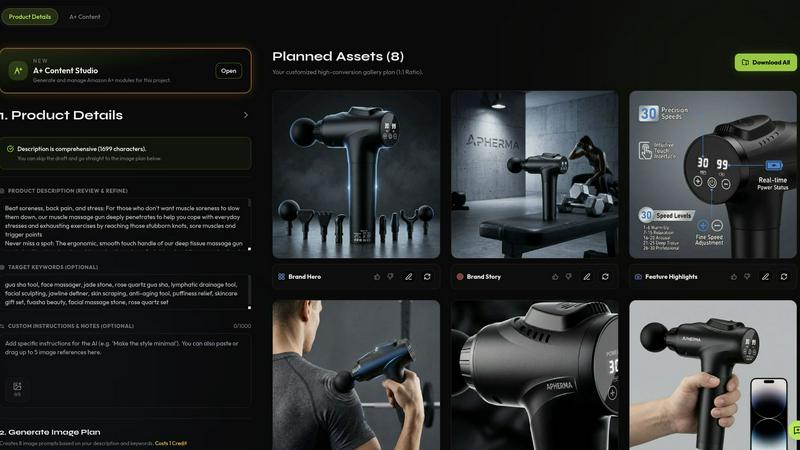
Rendery3D instantly generates professional, conversion-focused product images from a single photo, continuously refining your ecommerce visuals.
Last updated: April 13, 2026
Visual Comparison
Img Editor

Rendery3D
Feature Comparison
Img Editor
AI-Powered Image Generation
Img Editor utilizes advanced AI technology to generate high-quality images based on user prompts. This feature allows users to create professional-grade visuals in mere seconds, transforming simple ideas into complex, visually striking representations.
User-Friendly Interface
Designed with accessibility in mind, the platform features an intuitive interface that caters to users of all skill levels. This allows even those without technical expertise to create stunning images effortlessly, making creativity approachable for everyone.
Prompt Generator
The built-in prompt generator assists users in articulating their creative ideas more clearly. By suggesting various prompts, it encourages exploration and experimentation, helping users to discover new concepts and themes for their images.
Community Engagement Rewards
Img Editor fosters a vibrant community by allowing users to submit their creations to a gallery. Approved submissions earn users extra image generations, promoting user interaction and collaboration while enhancing the overall creative experience.
Rendery3D
Smart Shot Planning & Auto Art Direction
This foundational feature automates the entire creative strategy. By analyzing your uploaded product photo, Rendery3D's AI automatically generates a structured, optimized 9-image shot plan tailored to your specific item. It intelligently plans hero shots, lifestyle contexts, detail close-ups, infographics, and comparison images without requiring any manual prompting or creative direction from the user. This eliminates guesswork and ensures every critical angle for conversion is covered from the start, establishing a consistent and iterative framework for all your products.
Scene Generation with 3D-Rendered Aesthetic
Unlike generic AI tools that produce flat imagery, Rendery3D is engineered to place your product into any scene with a polished, photorealistic 3D-rendered look that drives higher click-through rates. You can use text prompts for customization or let the AI handle it automatically. Crucially, the technology is logo-safe, meticulously preserving key product details, labels, and branding elements to maintain accuracy and professional integrity in every generated image.
Listing & A+ Content Copy Generator
Rendery3D extends its AI capabilities beyond visuals to create the textual components of a high-performing listing. It generates compelling, SEO-optimized titles, bullet points, keyword suggestions, and full HTML descriptions that are strategically aligned with the visual story created for the product. For Amazon sellers, it also builds Premium A+ Content modules—including hero banners, comparison charts, and brand stories—sized to exact specifications, creating a unified and persuasive brand experience.
Custom Presets & Brand Style Management
For agencies and brands requiring absolute consistency, this feature allows you to upload 6-9 competitor or reference images to extract a complete style system. Rendery3D then locks generated output to match this preset, ensuring a cohesive look across an entire catalog or client portfolio. You can also save brand colors, logos, and style preferences, which the AI applies iteratively across all projects, streamlining workflow and reinforcing brand identity with every new set of images.
Use Cases
Img Editor
Marketing Campaigns
Marketers can leverage Img Editor to generate eye-catching visuals for advertisements and social media posts. By creating unique images tailored to specific campaigns, they can enhance brand engagement and capture audience attention effectively.
Digital Art Creation
Artists and designers can explore their creativity through Img Editor, generating original digital artworks. The platform's capabilities allow for experimentation with styles and themes, enabling artists to push the boundaries of their imagination.
Educational Projects
Educators can utilize Img Editor to create illustrative materials for lessons, making complex concepts easier to understand. By crafting visual aids, teachers can enhance learning experiences and foster greater engagement among students.
Personal Exploration
Casual creators can use Img Editor as a tool for personal expression and exploration. Whether for fun or as a hobby, users can create images that reflect their thoughts and feelings, allowing them to share their unique perspectives with the world.
Rendery3D
Amazon Product Launches
Accelerate time-to-market for new products. Instead of waiting weeks for a photoshoot and editing, sellers can upload a prototype or sample photo and generate a full set of Amazon-compliant, visually striking listing images and copy in minutes. This rapid, iterative cycle allows for quick testing and refinement, ensuring the listing is optimized for conversions from day one, giving new products a competitive edge immediately.
Catalog-Wide Creative Refreshes
Breath new life into an existing product catalog without the prohibitive cost of reshooting every item. Brands can systematically update old, low-quality images with a consistent, modern 3D-rendered aesthetic across hundreds of SKUs. This continuous improvement loop elevates the entire brand's storefront, potentially boosting click-through and conversion rates uniformly, which is essential for maintaining market relevance.
Ecommerce Agency Client Workflows
Agencies can dramatically scale their service delivery and profitability. Rendery3D enables the handling of multiple client projects simultaneously, delivering studio-quality assets at a fraction of the traditional time and cost. The project management tools and brand style presets ensure each client receives consistent, on-brand results, improving client satisfaction and allowing the agency to take on more business iteratively.
A/B Visual Testing & Portfolio Operations
Data-driven sellers and aggregators can use Rendery3D to quickly generate multiple visual variants (e.g., different backgrounds, compositions, or infographic styles) for rigorous A/B testing. This iterative process of create-test-optimize helps identify the highest-converting imagery with precision. For portfolio operators managing many brands, the tool standardizes quality and speeds up the asset production cycle across diverse product lines.
Overview
About Img Editor
Img Editor is a groundbreaking, free AI image generation platform that invites users from diverse backgrounds, including artists, designers, marketers, and casual creators, to embark on a creative journey. By harnessing state-of-the-art AI technology, Img Editor transforms ideas into breathtaking visual representations with ease and efficiency. Users can generate stunning images tailored to their needs, whether that be for marketing campaigns, unique digital art pieces, or personal exploration of creativity. The platform democratizes access to high-quality image generation by providing 10 free image generations each day, along with opportunities to earn additional generations through community engagement. This ensures that everyone can unleash their artistic potential without the burden of financial constraints. With an intuitive interface and powerful AI capabilities, Img Editor allows users to focus on their creative vision while the AI handles the technical intricacies, making the creative process not just accessible but also enjoyable and inspiring.
About Rendery3D
Rendery3D is a purpose-built AI platform that revolutionizes product listing creation for the modern ecommerce seller. It is engineered specifically for Amazon sellers, DTC brands, and ecommerce agencies who need to move fast and convert at a higher rate. The platform's core mission is to eliminate the traditional bottlenecks of product photography—costly studios, lengthy photoshoots, and inconsistent results—by transforming a single product photo into a complete, conversion-optimized visual suite. This cyclical process of upload, AI analysis, generation, and refinement ensures continuous improvement in listing quality. Rendery3D delivers more than just images; it generates a structured 9-image shot plan including compliant hero shots, engaging lifestyle scenes, benefit-focused infographics, and scale comparisons, all wrapped in a premium 3D-rendered aesthetic that stands out in crowded marketplaces. Furthermore, it closes the creative loop by producing SEO-optimized listing copy and A+ Content, aligning text and visuals into a cohesive, high-converting story. The platform's iterative feedback systems, like the Automatic Feedback Loop (AFL), audit and self-correct outputs, guaranteeing professional, logo-safe, and marketplace-ready assets every time, enabling brands to scale their visual identity efficiently and effectively.
Frequently Asked Questions
Img Editor FAQ
How many images can I generate for free each day?
Users can generate up to 10 images for free each day. This allows ample opportunity to explore creativity without any financial constraints.
Can I earn more image generations?
Yes, users can earn additional image generations by submitting their creations to the gallery. If approved, these submissions reward users with extra generations to continue their creative endeavors.
What types of images can I create with Img Editor?
Img Editor supports a wide range of image types, from illustrations and digital art to marketing visuals. Users can generate images based on specific prompts or themes, making it a versatile tool for various needs.
Is Img Editor suitable for beginners?
Absolutely! Img Editor is designed with a user-friendly interface that caters to all skill levels. Beginners will find it easy to navigate and create stunning visuals, making it an excellent starting point for anyone interested in digital art.
Rendery3D FAQ
What kind of input photo do I need?
You only need one clean product photo on a plain background to start. Even a basic smartphone photo can work effectively. The AI analyzes this image to understand your product's shape, details, and key features. For best results, ensure the product is well-lit and in focus. The platform is designed to iteratively improve from this starting point, building a complete visual set regardless of the initial photo's simplicity.
How does Rendery3D ensure brand consistency and logo safety?
Rendery3D uses advanced AI models specifically trained for ecommerce that prioritize the accurate preservation of logos, text, and critical product details. The Automatic Feedback Loop (AFL) audits each generated image for errors before delivery. Furthermore, the Brand Styles and Custom Preset features allow you to lock in colors, styles, and compositional rules, which the AI applies consistently across all future projects, creating a continuous cycle of on-brand output.
Can I customize the AI-generated images?
Yes, you have full control. You can fine-tune any image using custom text prompts, adjust scenes, or modify elements. Alternatively, you can set up brand preferences and let the AI handle everything automatically for a hands-off, scalable workflow. This balance between automation and customization supports an iterative creative process where you can generate a base set quickly and then refine specific images as needed.
Is there a free plan or trial?
Yes, Rendery3D offers a free plan that allows you to generate your first set of listing images without requiring a credit card. This lets you experience the full workflow—from upload to download—and see the quality of the 3D-rendered outputs firsthand. Paid plans with more extensive features, higher generation limits, and advanced tools like Custom Presets start at $45 per month.
Alternatives
Img Editor Alternatives
Img Editor is a pioneering platform in the image and photo category, designed to create breathtaking AI-generated images with ease. It harnesses advanced machine learning technology, making it a go-to tool for a diverse range of users, from artists to marketers. Despite its impressive capabilities, many users seek alternatives to Img Editor for various reasons, including pricing constraints, specific feature needs, or compatibility with different platforms. When exploring alternatives, it’s essential to evaluate the range of features offered, the user interface's intuitiveness, and the flexibility of the pricing model to ensure it aligns with your creative needs. Choosing the right alternative requires a careful assessment of your individual requirements and creative aspirations. Look for platforms that provide robust AI capabilities, ease of use, and a supportive community to enhance your creative journey. Furthermore, consider whether the alternative offers customizable options and sufficient image generation limits to fully unleash your potential without financial barriers.
Rendery3D Alternatives
Rendery3D is a conversion-first AI visual engine designed for ecommerce brands. It belongs to the specialized category of AI-powered product photography and listing creative platforms. Its core function is to transform basic product photos into a complete suite of Amazon-compliant and conversion-optimized visuals, including hero shots, lifestyle scenes, and infographics, while also generating aligned listing copy. Users often explore alternatives for several common reasons. These can include budget constraints, the need for different feature sets like video generation or 3D modeling, or a requirement to integrate with specific ecommerce platforms beyond Amazon. Some may seek more manual creative control or solutions tailored for very high-volume enterprise operations. When evaluating an alternative, it's crucial to assess its core specialization. Look for a tool engineered specifically for ecommerce quality and compliance, not just a generic AI image generator. Key considerations should include automated workflows for scaling production, consistency mechanisms to ensure brand and quality standards, and whether the platform offers a holistic solution that ties visuals to performance-driven copy.