
Img Editor vs Imgezy
Side-by-side comparison to help you choose the right product.

Img Editor
Effortlessly transform your ideas into stunning AI-generated images with Img Editor's advanced technology and prompt.
Last updated: February 28, 2026

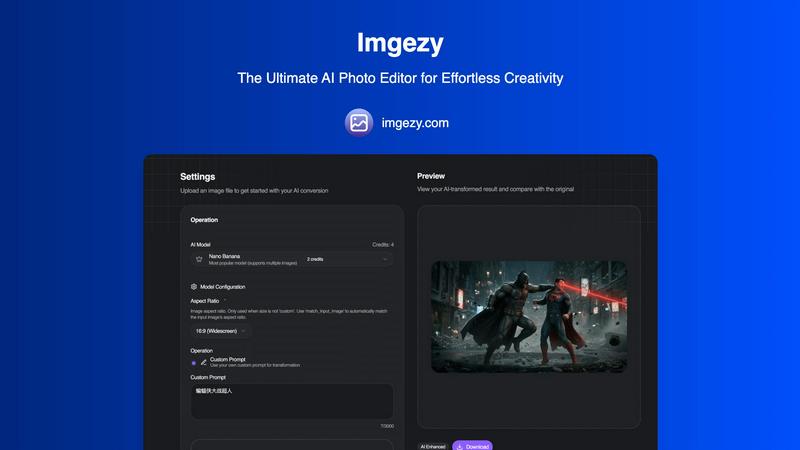
Imgezy
Imgezy transforms your photos effortlessly with AI, allowing you to edit, remove objects, and change backgrounds like a.
Last updated: March 1, 2026
Visual Comparison
Img Editor

Imgezy
Feature Comparison
Img Editor
AI-Powered Image Generation
Img Editor utilizes advanced AI technology to generate high-quality images based on user prompts. This feature allows users to create professional-grade visuals in mere seconds, transforming simple ideas into complex, visually striking representations.
User-Friendly Interface
Designed with accessibility in mind, the platform features an intuitive interface that caters to users of all skill levels. This allows even those without technical expertise to create stunning images effortlessly, making creativity approachable for everyone.
Prompt Generator
The built-in prompt generator assists users in articulating their creative ideas more clearly. By suggesting various prompts, it encourages exploration and experimentation, helping users to discover new concepts and themes for their images.
Community Engagement Rewards
Img Editor fosters a vibrant community by allowing users to submit their creations to a gallery. Approved submissions earn users extra image generations, promoting user interaction and collaboration while enhancing the overall creative experience.
Imgezy
Object Removal
Imgezy's object removal feature allows users to eliminate unwanted elements from their photos with remarkable precision. The AI intelligently identifies and reconstructs backgrounds, ensuring that no trace of the removed object remains, thereby preserving the integrity of the image.
Background Replacement
With Imgezy, changing backgrounds has never been easier. Users can swiftly replace dull or distracting backgrounds with vibrant scenes, such as stunning landscapes or solid colors, instantly enhancing the overall appeal of their photographs.
Photo Enhancement
The photo enhancement feature of Imgezy automatically optimizes images by adjusting colors, lighting, and sharpness. This ensures that every photo looks its best, making the edits professional-quality without requiring any manual adjustments.
Batch Processing
Imgezy supports batch processing, allowing users to edit multiple images simultaneously. This feature is a time-saver for those working on large projects, enabling efficient editing without sacrificing quality or detail.
Use Cases
Img Editor
Marketing Campaigns
Marketers can leverage Img Editor to generate eye-catching visuals for advertisements and social media posts. By creating unique images tailored to specific campaigns, they can enhance brand engagement and capture audience attention effectively.
Digital Art Creation
Artists and designers can explore their creativity through Img Editor, generating original digital artworks. The platform's capabilities allow for experimentation with styles and themes, enabling artists to push the boundaries of their imagination.
Educational Projects
Educators can utilize Img Editor to create illustrative materials for lessons, making complex concepts easier to understand. By crafting visual aids, teachers can enhance learning experiences and foster greater engagement among students.
Personal Exploration
Casual creators can use Img Editor as a tool for personal expression and exploration. Whether for fun or as a hobby, users can create images that reflect their thoughts and feelings, allowing them to share their unique perspectives with the world.
Imgezy
E-commerce Product Shots
Imgezy is ideal for e-commerce businesses needing high-quality product images. Users can quickly remove distractions, adjust backgrounds, and enhance visual appeal, making their listings more attractive to potential customers.
Travel Photography
Travel enthusiasts can use Imgezy to enhance their vacation photos. By removing unwanted tourists from the background and replacing it with breathtaking landscapes, users can create stunning memories that are perfect for sharing.
Social Media Content Creation
Marketers and influencers can leverage Imgezy to generate captivating content for their social media platforms. The ability to edit photos quickly and effectively allows for more engaging posts that capture audience attention.
Personal Projects and Memories
Imgezy is perfect for personal use, enabling individuals to edit family photos or memories with ease. Users can enhance their images, making them look professional, and preserve cherished moments in the best possible light.
Overview
About Img Editor
Img Editor is a groundbreaking, free AI image generation platform that invites users from diverse backgrounds, including artists, designers, marketers, and casual creators, to embark on a creative journey. By harnessing state-of-the-art AI technology, Img Editor transforms ideas into breathtaking visual representations with ease and efficiency. Users can generate stunning images tailored to their needs, whether that be for marketing campaigns, unique digital art pieces, or personal exploration of creativity. The platform democratizes access to high-quality image generation by providing 10 free image generations each day, along with opportunities to earn additional generations through community engagement. This ensures that everyone can unleash their artistic potential without the burden of financial constraints. With an intuitive interface and powerful AI capabilities, Img Editor allows users to focus on their creative vision while the AI handles the technical intricacies, making the creative process not just accessible but also enjoyable and inspiring.
About Imgezy
Imgezy is a groundbreaking AI photo editing platform that redefines the way we approach digital creativity. It empowers users to transform their images using simple text instructions, making high-level photo editing accessible to everyone, from novices to seasoned professionals. With Imgezy, the need for complicated tools, layers, and extensive design experience is completely eliminated. Users can effortlessly edit images by describing what they want to change, such as "remove the person on the left" or "change the background to a sunny beach." This ease of use enables a vast community of over 200,000 creators to harness the power of AI for their projects. Imgezy is built on a foundation of continuous improvement, constantly refining its algorithms to ensure users receive pixel-perfect results every time they edit. Whether enhancing travel photos, perfecting product images for e-commerce, or creating captivating content for social media, Imgezy is your intelligent partner in creativity, turning your visions into reality within seconds.
Frequently Asked Questions
Img Editor FAQ
How many images can I generate for free each day?
Users can generate up to 10 images for free each day. This allows ample opportunity to explore creativity without any financial constraints.
Can I earn more image generations?
Yes, users can earn additional image generations by submitting their creations to the gallery. If approved, these submissions reward users with extra generations to continue their creative endeavors.
What types of images can I create with Img Editor?
Img Editor supports a wide range of image types, from illustrations and digital art to marketing visuals. Users can generate images based on specific prompts or themes, making it a versatile tool for various needs.
Is Img Editor suitable for beginners?
Absolutely! Img Editor is designed with a user-friendly interface that caters to all skill levels. Beginners will find it easy to navigate and create stunning visuals, making it an excellent starting point for anyone interested in digital art.
Imgezy FAQ
How does Imgezy work?
Imgezy utilizes advanced AI algorithms that interpret user descriptions to make specific edits to images. Users simply upload their photos and describe the changes they want, and the AI does the rest.
What types of images can I edit with Imgezy?
Imgezy supports all major image formats, including JPG, PNG, and WebP, making it versatile for various types of projects, whether personal or professional.
Is there a limit to how many edits I can make?
The number of edits you can perform depends on the plan you choose. Each plan offers a set number of credits, which determine how many images you can edit in a month.
Can I use Imgezy for commercial purposes?
Yes, Imgezy offers plans that include a commercial license, allowing users to utilize edited images for business and marketing purposes without any legal concerns.
Alternatives
Img Editor Alternatives
Img Editor is a pioneering platform in the image and photo category, designed to create breathtaking AI-generated images with ease. It harnesses advanced machine learning technology, making it a go-to tool for a diverse range of users, from artists to marketers. Despite its impressive capabilities, many users seek alternatives to Img Editor for various reasons, including pricing constraints, specific feature needs, or compatibility with different platforms. When exploring alternatives, it’s essential to evaluate the range of features offered, the user interface's intuitiveness, and the flexibility of the pricing model to ensure it aligns with your creative needs. Choosing the right alternative requires a careful assessment of your individual requirements and creative aspirations. Look for platforms that provide robust AI capabilities, ease of use, and a supportive community to enhance your creative journey. Furthermore, consider whether the alternative offers customizable options and sufficient image generation limits to fully unleash your potential without financial barriers.
Imgezy Alternatives
Imgezy is a revolutionary AI photo editor that simplifies the editing process by transforming text descriptions into expertly edited photos. Positioned in the image and photo editing category, it caters to a wide range of users, from novices to experienced professionals. Many users often seek alternatives to Imgezy for various reasons, including pricing, specific features, or compatibility with their preferred platforms. When choosing an alternative, it's essential to look for user-friendliness, the range of editing capabilities, and the level of support provided, ensuring that the tool aligns well with individual creative needs and workflows.