
Motion Control AI
Motion Control AI generates precise, repeatable videos from images using guided motion based on your reference clips.
Visit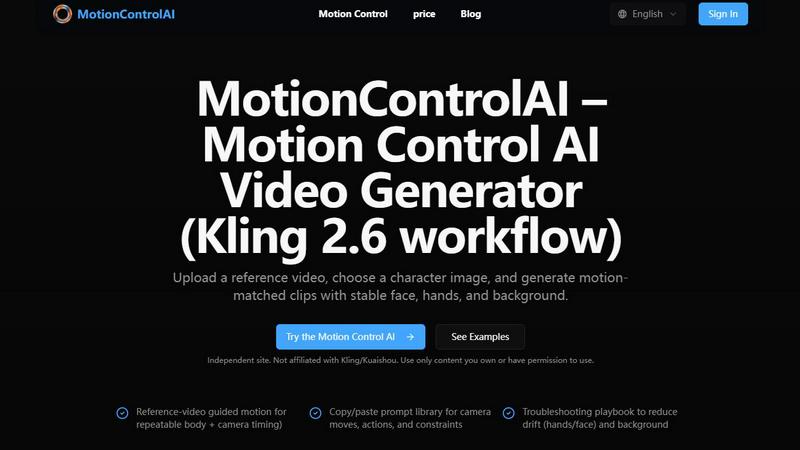
About Motion Control AI
Motion Control AI is an innovative resource hub and workflow platform tailored to empower creators with advanced capabilities in AI video generation. Utilizing the sophisticated Kling 2.6 model, it allows users to transform static character images into vibrant, dynamic videos. The platform offers a unique feature of reference video-guided motion, which meticulously matches body movements, gestures, and camera dynamics to a chosen reference clip. This constraint-based system enhances the predictability and repeatability of AI-generated content, setting it apart from traditional text-to-video methods. Designed specifically for filmmakers, animators, marketers, and digital artists, Motion Control AI ensures that creators can maintain character consistency across scenes, iterate on their concepts, and bring their creative visions to life with precision. Its comprehensive ecosystem includes prompt templates, troubleshooting guides, and real-world examples, promoting a cycle of continuous learning and improvement that is essential for mastering AI-generated content creation.
Features of Motion Control AI
Reference Video Guidance
This feature allows users to upload a reference video, which guides the motion, timing, and dynamics of the generated video. By replicating the exact movements from the reference clip, creators achieve a level of realism and consistency that is crucial for professional-quality content.
Motion-Matched Clips
With Motion Control AI, users can select a character image and generate clips that align perfectly with the reference video. This ensures that facial expressions, hand movements, and background elements are synchronized, resulting in high-fidelity video outputs that maintain a natural flow.
Copy/Paste Prompt Library
The platform includes a robust library of prompts that users can easily copy and paste to facilitate rapid iteration. These prompts cover various aspects of video creation, including camera moves, actions, and constraints, allowing creators to focus on their artistic vision without getting bogged down in technical details.
Troubleshooting Playbook
Motion Control AI provides a comprehensive troubleshooting guide that addresses common issues such as drift in hands, facial expressions, and background stability. This resource is invaluable for users seeking to refine their outputs and ensure a polished final product, enhancing the overall user experience.
Use Cases of Motion Control AI
Filmmaking
Filmmakers can leverage Motion Control AI to create dynamic character animations that align with live-action footage. By using reference clips, they can ensure that character movements are synchronized seamlessly with their cinematic vision, making it easier to achieve a cohesive narrative.
Animation
Animators can utilize the platform to replicate complex body dynamics and gestures, allowing them to enhance their animated characters with lifelike movements. This capability opens new avenues for storytelling and character development, making animations more engaging and relatable.
Marketing Campaigns
Marketers can employ Motion Control AI to produce eye-catching promotional videos featuring animated characters that convey brand messages effectively. The ability to control character consistency and motion fidelity enables the creation of memorable and impactful marketing content.
Digital Art Projects
Digital artists can enhance their portfolios by integrating motion into their static creations. By transforming still images into animated sequences, artists can showcase their work in innovative ways, attracting a wider audience and demonstrating their versatility.
Frequently Asked Questions
How does Motion Control AI ensure motion fidelity?
Motion Control AI utilizes reference video guidance to ensure that body movements, gestures, and camera dynamics are accurately replicated, resulting in high-fidelity outputs that maintain consistency across scenes.
Can I use my own content with Motion Control AI?
Yes, Motion Control AI is designed to work with content you own or have permission to use. This independent platform allows creators to upload their own character images and reference videos for generating custom animations.
Is there a learning curve to using Motion Control AI?
While the platform is user-friendly, there are resources available, including video tutorials and guides, that can help users understand the motion control workflows and prompt strategies to maximize their creative output.
What types of creators can benefit from Motion Control AI?
Motion Control AI is ideal for a diverse range of creators, including filmmakers, animators, marketers, and digital artists, all of whom can leverage its capabilities to enhance their projects and achieve specific creative visions.
Explore more in this category:
Similar to Motion Control AI

Add an original two-person AI duet or portrait step to a creative workflow, using adult photos and paid credits.

AI video platform for faceless Reels: cinematic clips with native audio and auto-posting

Create AI UGC video ads from a product URL, image, or script with lifelike creators, natural voices, captions, product visuals, and clear CTAs.

Create videos from prompts and images with RunwayAI, an independent Runway AI video generator with live tracking and API access.

Create videos from text, images, or references with Happy Horse AI and its Happy Horse API.

Enhance photos, create images, and generate videos with AI workflows, effects, and production-tested models.

Create Wan AI videos from text, images, references, and clips with Wan 2.7 workflows, task history, cost estimates, and API access.

Turn videos, images, and files into secure direct links for sharing, embedding, and automated workflows.